<?xml version="1.0" encoding="utf-8"?><feed xmlns="http://www.w3.org/2005/Atom" ><generator uri="https://jekyllrb.com/" version="4.4.1">Jekyll</generator><link href="https://miyagawa.co/blog/feed.xml" rel="self" type="application/atom+xml" /><link href="https://miyagawa.co/blog/" rel="alternate" type="text/html" /><updated>2025-12-18T01:42:39+00:00</updated><id>https://miyagawa.co/blog/feed.xml</id><title type="html">Tatsuhiko Miyagawa’s Blog</title><subtitle>A blog about software engineering, podcasting, gadgets, and productivity.</subtitle><author><name>Tatsuhiko Miyagawa</name></author><entry><title type="html">Scraping Apple News+</title><link href="https://miyagawa.co/blog/scraping-apple-news-plus" rel="alternate" type="text/html" title="Scraping Apple News+" /><published>2024-07-18T00:00:00+00:00</published><updated>2024-07-18T00:00:00+00:00</updated><id>https://miyagawa.co/blog/apple-news</id><content type="html" xml:base="https://miyagawa.co/blog/scraping-apple-news-plus"><![CDATA[<p>I’ve been an Apple News+ subscriber for the past year or so, just to be able to read paywalled articles from WSJ, Business Insider, WIRED, and The Atlantic etc. It’s not my primary news source (I use <a href="https://www.feedly.com/">Feedly</a> via <a href="https://reederapp.com/">Reeder</a>), but when I encounter links to these sites on socials or via RSS feeds, I open the link with the News.app. A keyboard shortcut for <a href="https://choosy.app/">Choosy</a> helps a lot for this.</p>

<blockquote>
  <p>That ended today when I learned that Apple had struck a deal with Taboola, a company known for serving low-quality ads next to web content.
<a href="https://om.co/2024/07/16/taboola-apple-news-no-thanks/">Taboola + Apple News? No thanks – On my Om</a></p>
</blockquote>

<p>The reading experience on News+ is actually pretty terrible because of the number of ads on it even before this deal with Taboola, which would make it even worse. The thing is, I don’t read them on News+. I do extract the plaintext version of the news from News+ to read it later, outside the app.</p>

<p>Let me explain how to automate it.</p>

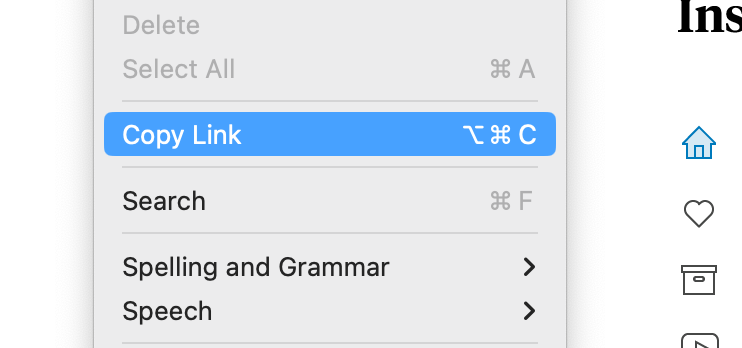
<p>When you open an article on News app on the Mac, you can get the link for the article via a keyboard shortcut: <code class="language-plaintext highlighter-rouge">Cmd-Alt-C</code>:</p>

<figure class="image">
  <img src="/blog/img/apple-news-link.png" alt="" />
  <figcaption></figcaption>
</figure>

<p>And you can extract the full body of the article by simply selecting the body with “Select All,” i.e. <code class="language-plaintext highlighter-rouge">Cmd-A</code>, then <code class="language-plaintext highlighter-rouge">Cmd-C</code>. Fortunately, this won’t include any text from the ads on the page.</p>

<figure class="image">
  <img src="/blog/img/apple-news-select-all.png" alt="" />
  <figcaption></figcaption>
</figure>

<p>The title of the article is already included in the body when you select all, but alternatively, it is available via the URL we retrieved from the <code class="language-plaintext highlighter-rouge">Copy Link</code> above. That URL contains a redirect page to open the News app on the Mac, but that page has a <code class="language-plaintext highlighter-rouge">&lt;title&gt;</code> tag for the article itself.</p>

<figure class="image">
  <img src="/blog/img/apple-news-title.png" alt="" />
  <figcaption></figcaption>
</figure>

<p>Given all that, you can write a script to run on a Mac to get:</p>

<ul>
  <li>Link (via <code class="language-plaintext highlighter-rouge">Copy Link</code>)</li>
  <li>Title (via HTML of the link above)</li>
  <li>Plaintext Content without ads (via Select All, then copy)</li>
</ul>

<div class="language-plaintext highlighter-rouge"><div class="highlight"><pre class="highlight"><code>#!/bin/bash
# select text, then Cmd-C
# brew install cliclick
cliclick dc:.
sleep 0.2
osascript -e 'tell application "System Events" to keystroke "a" using command down'
osascript -e 'tell application "System Events" to keystroke "c" using command down'
body=$(pbpaste)
	
# send Cmd-alt-C to copy the URL
osascript -e 'tell application "System Events" to keystroke "c" using (command down, option down)'
url=$(pbpaste)

# get the $url to look for &lt;title&gt; to get the title
# brew install html-xml-utils
title=$(curl -s $url | hxselect -c title)

# do something with $body, $title and $url
</code></pre></div></div>

<p>The script uses <a href="https://github.com/BlueM/cliclick">cliclick</a> to force a double click, to make sure <code class="language-plaintext highlighter-rouge">Cmd-A</code> can actually grab the text from the article. For some reason, <code class="language-plaintext highlighter-rouge">Cmd-A</code> doesn’t actually select it until you click the article page to get the focus.</p>

<p>I added this script to <a href="https://www.alfredapp.com/">Alfred</a> so that I can run it with a keyboard shortcut (<code class="language-plaintext highlighter-rouge">Shift-Alt-E</code>), and hooked it up with <a href="https://folivora.ai/">BetterTouchTool</a> so that I can tap on 4-finger to invoke it on the News app.</p>

<p>Once you get the link, title and body of an article, you can do whatever you want with it. In my case, I have another script to save it to <a href="https://www.instapaper.com/">Instapaper</a> via API, and read them later.</p>

<figure class="image">
  <img src="/blog/img/apple-news-reeder.png" alt="" />
  <figcaption></figcaption>
</figure>]]></content><author><name>Tatsuhiko Miyagawa</name></author><summary type="html"><![CDATA[I’ve been an Apple News+ subscriber for the past year or so, just to be able to read paywalled articles from WSJ, Business Insider, WIRED, and The Atlantic etc. It’s not my primary news source (I use Feedly via Reeder), but when I encounter links to these sites on socials or via RSS feeds, I open the link with the News.app. A keyboard shortcut for Choosy helps a lot for this.]]></summary></entry><entry><title type="html">miyagawa.co</title><link href="https://miyagawa.co/blog/miyagawa-co" rel="alternate" type="text/html" title="miyagawa.co" /><published>2023-07-07T00:00:00+00:00</published><updated>2023-07-07T00:00:00+00:00</updated><id>https://miyagawa.co/blog/miyagawa-co</id><content type="html" xml:base="https://miyagawa.co/blog/miyagawa-co"><![CDATA[<p>Last month, Medium silently decided to kill the legacy custom domains for free tier users, and broke my blog (<code class="language-plaintext highlighter-rouge">weblog.bulknews.net</code>) without any notice. Since this happened during my trip to Europe, I decided to sign up for their paid plan just for one month as a temporary solution. Now that I’ve returned from my trip, I successfully imported all my articles from Medium to Jekyll using the excellent tool called <a href="https://github.com/Donohue/medium-to-jekyll">medium-to-jekyll importer</a>, and now this site is hosted on GitHub Pages.</p>

<p>Fast forward to this week, Meta launched <a href="https://www.threads.net">Threads</a> and it uses the same username as Instagram. Because Instagram originally launched just for iPhones, and by the time it became available on Android, it was too late to secure my preferred username <sup id="fnref:username"><a href="#fn:username" class="footnote" rel="footnote" role="doc-noteref">1</a></sup>. I initially registered with <code class="language-plaintext highlighter-rouge">bulknews</code>, but because Instagram prominently displays the username in the timeline feed I changed it to a little more readable: <code class="language-plaintext highlighter-rouge">miyagawa_</code>.</p>

<p>At first, the existence of the underscore didn’t bother much. However, now that it’s also used in Threads and as with IG it’s always displayed in the timeline, it started to bother me. The same thing happened to my secondary Instagram account for my podcast <a href="https://rebuild.fm">Rebuild</a>. I initially tried <code class="language-plaintext highlighter-rouge">rebuildfm</code> which I use elsewhere, but it was already taken. Luckily, Instagram allows the use of dots in the username, so I settled for <code class="language-plaintext highlighter-rouge">rebuild.fm</code> which somehow felt reasonable. This got me thinking: What if I could do the same for my main account, like a domain name?</p>

<p>For a while, I’ve wanted a new online identity that isn’t tied to a toy website that I built 25 years ago: <a href="https://bulknews.net">bulknews.net</a>. It’s often a little awkward to explain what that name means, and it’s also my primary email address and is challenging to pronounce over the phone.</p>

<p>So, yesterday I acquired a new domain, <a href="https://miyagawa.co">miyagawa.co</a> from Gandi, and migrated the traffic to the old blog URL (<code class="language-plaintext highlighter-rouge">https://weblog.bulknews.net/</code>) to this new domain using redirects through <a href="https://www.fastly.com">Fastly</a>. Setting up the redirects was pretty simple with a custom VCL snippet. (Disclosure: I work for Fastly)</p>

<p>And yes, I also changed the username on <a href="https://instagram.com/miyagawa.co/">Instagram</a>/<a href="https://www.threads.net/@miyagawa.co">Threads</a> to match my new domain.</p>

<figure class="image">
  <img src="/blog/img/threads.png" alt="" />
  <figcaption></figcaption>
</figure>

<p>It’s not perfect, but is a good compromise. And it feels good that I have a short, memorable, and easy-to-pronounce domain that I can use for various purposes.</p>

<div class="footnotes" role="doc-endnotes">
  <ol>
    <li id="fn:username">
      <p>Interestingly, whoever had the username <code class="language-plaintext highlighter-rouge">miyagawa</code> apparently changed their username at some point, so the current holder is a different account. Maybe I should’ve written a scraper to periodically check the availability of the username! <a href="#fnref:username" class="reversefootnote" role="doc-backlink">&#8617;</a></p>
    </li>
  </ol>
</div>]]></content><author><name>Tatsuhiko Miyagawa</name></author><summary type="html"><![CDATA[Last month, Medium silently decided to kill the legacy custom domains for free tier users, and broke my blog (weblog.bulknews.net) without any notice. Since this happened during my trip to Europe, I decided to sign up for their paid plan just for one month as a temporary solution. Now that I’ve returned from my trip, I successfully imported all my articles from Medium to Jekyll using the excellent tool called medium-to-jekyll importer, and now this site is hosted on GitHub Pages.]]></summary></entry><entry><title type="html">Podcasting Setup 2020</title><link href="https://miyagawa.co/blog/podcasting-setup-2020" rel="alternate" type="text/html" title="Podcasting Setup 2020" /><published>2020-03-28T00:00:00+00:00</published><updated>2020-03-28T00:00:00+00:00</updated><id>https://miyagawa.co/blog/podcasting-setup-2020</id><content type="html" xml:base="https://miyagawa.co/blog/podcasting-setup-2020"><![CDATA[<p>It’s been a while since the last time I wrote about <a href="https://miyagawa.co/blog/podcasting-guide-2017">my podcasting setup</a> (link in Japanese). Although I haven’t changed most of the setup since the stability is one of the most important things, I’d like to note the current setup since it might be interesting to a future podcaster.</p>

<figure class="image">
  <img src="/blog/img/1G2YVn7N7Mf-_1NS8KQTGMA.png" alt="Beta87A and US2x2" />
  <figcaption>Beta87A and US2x2</figcaption>
</figure>

<h3 id="recording-environment">Recording Environment</h3>

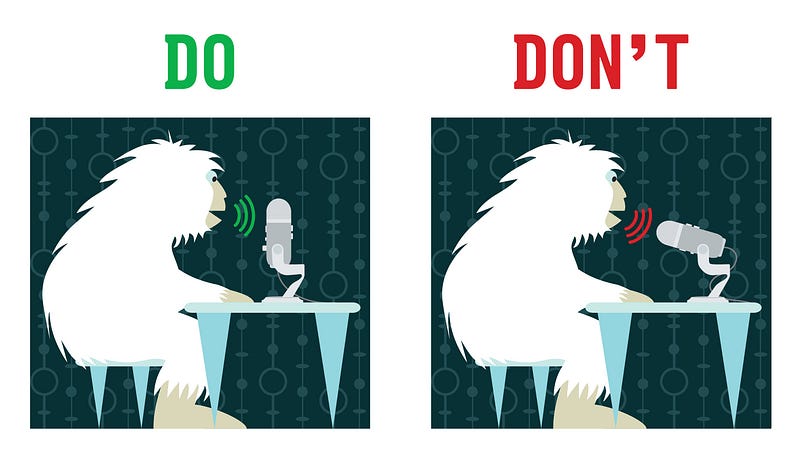
<p>Before getting to the gears, it is important to pick where to record. The most ideal environment is a room with a lot of clothes (like a walk-in closet), or sound isolation pads that prevents echos. Avoid a room with concrete floor or walls, since that will create a lot of reflections and reverbs.</p>

<p>The room should be reasonably close to your wireless router or have a wired ethernet connection, if you intend to have a call with your guest over the internet.</p>

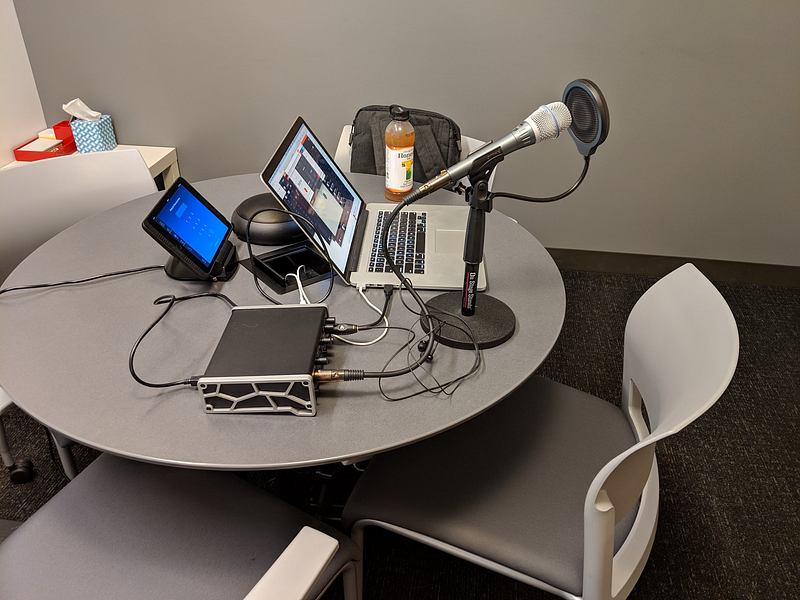
<p>I’ve been recording at my employer’s office since it’s easy to do so during the weekends, and some of the meeting rooms have a really nice audio treatment. As of this writing however, the office is in its closure due to COVID-19 and I record from my bedroom.</p>

<h3 id="hardware">Hardware</h3>

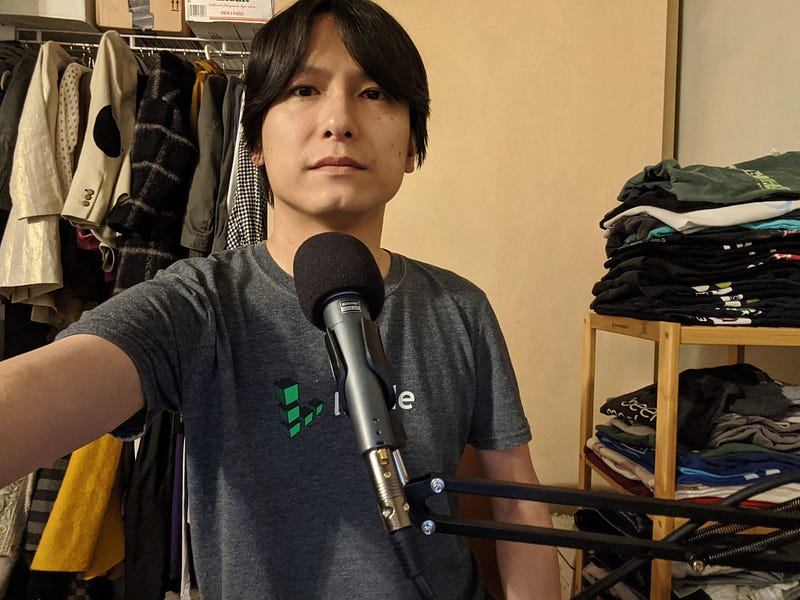
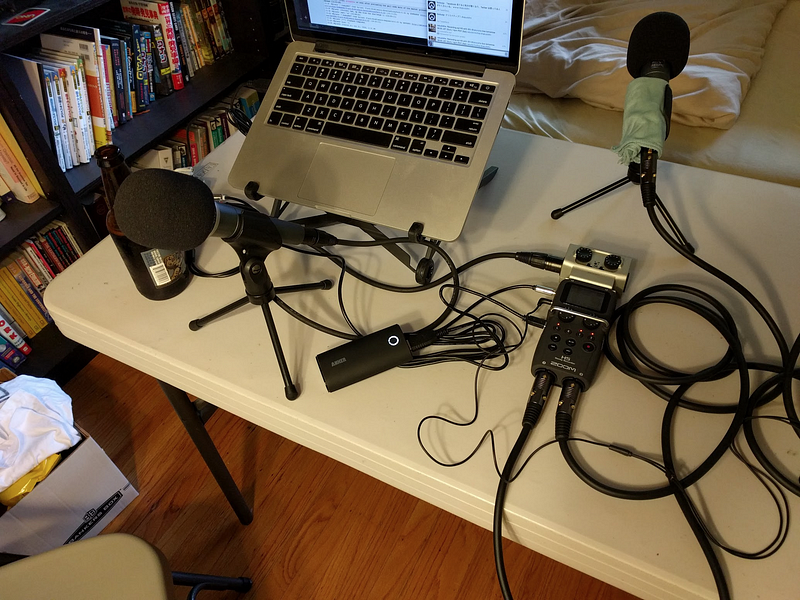
<p>As for microphones I’ve been bouncing between multiple microphones, but always get back to Shure’s BETA series. <a href="https://www.amazon.com/Shure-Supercardioid-Condenser-Microphone-Applications/dp/B0002BACBO/ref=as_li_ss_tl?dchild=1&amp;keywords=beta+87a&amp;qid=1585430984&amp;sr=8-1-spons&amp;psc=1&amp;spLa=ZW5jcnlwdGVkUXVhbGlmaWVyPUEzTFFGMVZLN0I2T1c5JmVuY3J5cHRlZElkPUEwNjk1ODg0MllBUFQ0N1BCRUdRViZlbmNyeXB0ZWRBZElkPUEwNjE4NzEyMzdWOUM4RVk3NjFSOCZ3aWRnZXROYW1lPXNwX2F0ZiZhY3Rpb249Y2xpY2tSZWRpcmVjdCZkb05vdExvZ0NsaWNrPXRydWU=&amp;linkCode=ll1&amp;tag=bulknewstypep-20&amp;linkId=46c777fa40911c11ba88b963502fa633&amp;language=en_US">Beta 87A</a> (super cardioid condenser, $250) gives a pretty bright pickup pattern and I love the tonality of it, but due to it being a condenser microphone it still picks up <em>some</em> ambient noise and especially my mouth noise, although it’s not as bad as other condenser microphones. <a href="https://www.amazon.com/Shure-BETA-57A-Supercardioid-Applications/dp/B0002BACAK/ref=as_li_ss_tl?dchild=1&amp;keywords=shure+beta+57a&amp;qid=1585430912&amp;sr=8-4&amp;x=0&amp;y=0&amp;linkCode=ll1&amp;tag=bulknewstypep-20&amp;linkId=887d26b298ea0d242c4bcd0cd56f10da&amp;language=en_US">Beta 57A </a>(super cardioid dynamic, $140) is a dynamic microphone and doesn’t have this problem at all. It is really a versatile microphone and has been helpful since I record from my bedroom with unexpected ambient noise from the neighbor rooms. Beta 57A’s pickup pattern sounds a bit mushy and has a harsh sibilance for my voice, but it’s not hard to fix in post with some EQ.</p>

<p>For the USB Audio Interface, I switched from Tascam’s US2x2 to <a href="https://www.amazon.com/MOTU-M4-USB-C-Audio-Interface/dp/B08129P2XY/ref=as_li_ss_tl?dchild=1&amp;keywords=MOTU+M4&amp;qid=1585431093&amp;sr=8-3&amp;linkCode=ll1&amp;tag=bulknewstypep-20&amp;linkId=ed5a63d5e28d2ab3f7f1bb63ae87fc25&amp;language=en_US">MOTU M4</a> ($220), and I absolutely love it. The audio is really clean and has a lot of gain, and it comes with a hardware power switch, LCD meter, USB-C input, playback/monitor level knob, and an additional loopback channel, which is great for when streaming live.</p>

<figure class="image">
  <img src="/blog/img/0hg5mrOKbTty_ggkC" alt="" />
  <figcaption></figcaption>
</figure>

<p>A <a href="https://www.amazon.com/gp/product/B0002M3OVI?ie=UTF8&amp;camp=213733&amp;creative=393185&amp;creativeASIN=B0002M3OVI&amp;linkCode=shr&amp;tag=bulknewstypep-20&amp;linkId=RIQHLAURNJBML2CC&amp;qid=1419995048&amp;sr=8-1&amp;keywords=ds7200b">microphone stand</a> (DS 7200B, $16) and/or <a href="https://www.amazon.com/gp/product/B01L3LL95O/ref=as_li_ss_tl?ie=UTF8&amp;psc=1&amp;linkCode=ll1&amp;tag=bulknewstypep-20&amp;linkId=bcf2703792fc85f5ef6c70cb5772270a&amp;language=en_US">boom arm</a> (InnoGear, $12) is important to keep the microphone close to your mouth, 5–8 inches away. Try not to be *too *close to the microphone since that will get your voice sound too bass-y due to the proximity effect. I haven’t used any boom arm before, but as of this writing, this boom arm is very helpful to keep the mic close to my mouth when I need to record from my bedroom.</p>

<p>It is critical to use an <a href="https://www.amazon.com/MEE-audio-Detachable-Universal-Fit-Noise-Isolating/dp/B07B4PR2GD/ref=as_li_ss_tl?ascsub&amp;cv_ct_cx=in+ear+monitor&amp;cv_ct_id=amzn1.osa.4270e09a-bbd9-49ba-8bd6-78ea3b5fd86a.ATVPDKIKX0DER.en_US&amp;cv_ct_pg=search&amp;cv_ct_wn=osp-search&amp;dchild=1&amp;keywords=in+ear+monitor&amp;pd_rd_i=B07B4PR2GD&amp;pd_rd_r=2a57c5eb-5c40-4786-a7d1-cabe1af73080&amp;pd_rd_w=ZSCwF&amp;pd_rd_wg=1clnF&amp;pf_rd_p=3494954a-3e59-449e-91eb-b8736f013ede&amp;pf_rd_r=KMM693Q6XV3MKYWC0ERG&amp;qid=1585431140&amp;sr=1-4-32a32192-7547-4d9b-b4f8-fe31bfe05040&amp;linkCode=ll1&amp;tag=bulknewstypep-20&amp;linkId=7a327e122894e9baae9aedbf5eaaa64d&amp;language=en_US">in-ear monitor</a> (MEE M6, $50), closed headphones, or earbuds since using open headphones will leak the audio and bleed it to your recordings. Make sure your guest uses an in-ear headphone with tight-fit ear tips as well.</p>

<h4 id="cheaper-alternatives">Cheaper Alternatives</h4>

<p>Here’s a few alternatives that are more affordable. I usually recommend them, and send them to my guests when they don’t have any microphones. Most of them need a pop filter or a windscreen.</p>

<p><a href="https://www.amazon.com/Audio-Technica-ATR2100x-USB-Cardioid-Microphone-ATR/dp/B07ZPBFVKK/ref=as_li_ss_tl?keywords=atr2100&amp;qid=1585433255&amp;s=musical-instruments&amp;sr=1-2&amp;linkCode=ll1&amp;tag=bulknewstypep-20&amp;linkId=c2589c80526c0d6e988d8cee48b4089e&amp;language=en_US">Audio Technica ATR2100x USB</a> ($100) — This is a USB/XLR dynamic microphone with an upgraded USB-C output. Handy for traveling, and you can even record both to computers via USB and a portable recorder via XLR.</p>

<p><a href="https://www.amazon.com/Samson-Handheld-Microphone-Recording-Podcasting/dp/B001R747SG/ref=as_li_ss_tl?keywords=Q2U&amp;qid=1585433426&amp;s=electronics&amp;sr=1-1&amp;linkCode=ll1&amp;tag=bulknewstypep-20&amp;linkId=2ec5a8972cc1e7d92ee1ed5e1b595332&amp;language=en_US">Samson Q2U</a> ($85)— Almost the same as ATR2100, but with an old micro USB output.</p>

<p><a href="https://www.amazon.com/Rode-NT-USB-Mini-Microphone-Detachable-Headphone/dp/B084P1CXFD/ref=as_li_ss_tl?keywords=rode+nt+mini&amp;qid=1585433353&amp;s=electronics&amp;sr=1-3&amp;linkCode=ll1&amp;tag=bulknewstypep-20&amp;linkId=084fa95e9d6ceade24d74d6e39aa823a&amp;language=en_US">Rode NT-USB Mini</a> ($100)— A USB condenser microphone. It is very small, yet heavy and sounds great especially when you speak closer enough to the microphone. It’s a condenser microphone and tends to pickup some ambient noise from the room though. I use this mic when making Zoom calls for my work.</p>

<p><a href="https://www.amazon.com/Rode-PODMIC-Dynamic-Podcasting-Microphone/dp/B07MSCRCVK/ref=as_li_ss_tl?keywords=podmic&amp;qid=1585433485&amp;s=electronics&amp;sr=1-4&amp;linkCode=ll1&amp;tag=bulknewstypep-20&amp;linkId=666538e7bb9243445f3ee1b69ca5c8c2&amp;language=en_US">Rode PodMic</a> ($100) — I haven’t tried myself, but have seen some great reviews. This is an XLR microphone and you need a USB audio interface to connect to the computer.</p>

<h4 id="microphone-technique">Microphone Technique</h4>

<p>Some microphones are top-addressed and others are side-addressed. Learn which one your microphone is, and speak from the right angle.</p>

<figure class="image">
  <img src="/blog/img/0seqQya4QcwViyZyF" alt="" />
  <figcaption></figcaption>
</figure>

<p>via <a href="https://twitter.com/bluemicrophones/status/755062370041470976">https://twitter.com/bluemicrophones/status/755062370041470976</a></p>
<h4 id="mobile-recording">Mobile Recording</h4>

<p>I haven’t done a lot of in-person recordings, but when I do, I use <a href="https://www.amazon.com/Zoom-H5-Four-Track-Portable-Recorder/dp/B00KCXMBES/ref=as_li_ss_tl?keywords=zoom+h5&amp;qid=1585434364&amp;sr=8-4&amp;x=0&amp;y=0&amp;linkCode=ll1&amp;tag=bulknewstypep-20&amp;linkId=a7f4b18279807daf352500d6bfb21760&amp;language=en_US">Zoom H5</a> ($280) paired with a few Beta 57a’s. H5 is a versatile portable audio interface, and can record it to its SD card as well. You can pair it with <a href="https://www.amazon.com/Behringer-U-Control-UCA202-Ultra-Low-Interface/dp/B000KW2YEI/ref=as_li_ss_tl?ie=UTF8&amp;linkCode=ll1&amp;tag=bulknewstypep-20&amp;linkId=f238081e37fa486a221f074eaba0e118&amp;language=en_US">Behringer UCA202</a> ($35) to send the monitor output to the computer, since H5 doesn’t let you record the SD card and use it as a USB interface at the same time.</p>

<p>If you do a lot of mobile recordings, I’d consider <a href="https://www.rode.com/rodecasterpro">Rodecaster Pro</a> or <a href="https://www.zoom-na.com/products/production-recording/live-sound-recording/zoom-livetrak-l-8">Zoom L-8</a>.</p>

<h3 id="software">Software</h3>

<h4 id="recording--streaming">Recording &amp; Streaming</h4>

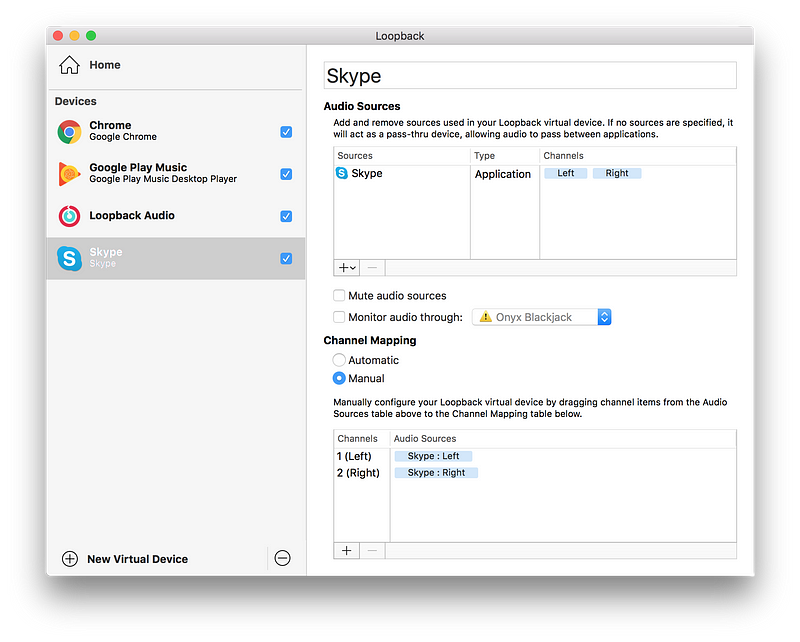
<p>I record the show over <a href="https://discordapp.com/">Discord</a> calls. Most of the time Discord has the cleanest audio with very little lags, and has reasonable amount of options to tweak when something goes wrong. Sometimes the server is overloaded, or the latency is unbearable and makes it hard to make a conversation, and we fallback to Skype, or FaceTime audio. I configure these VOIP apps to send the output to the audio interface (M4).</p>

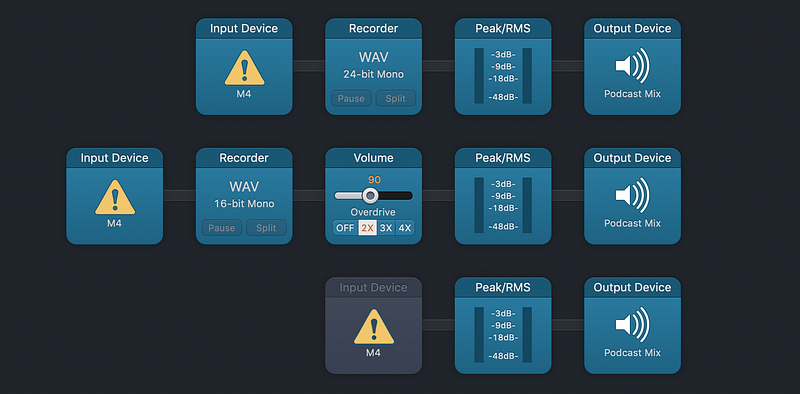
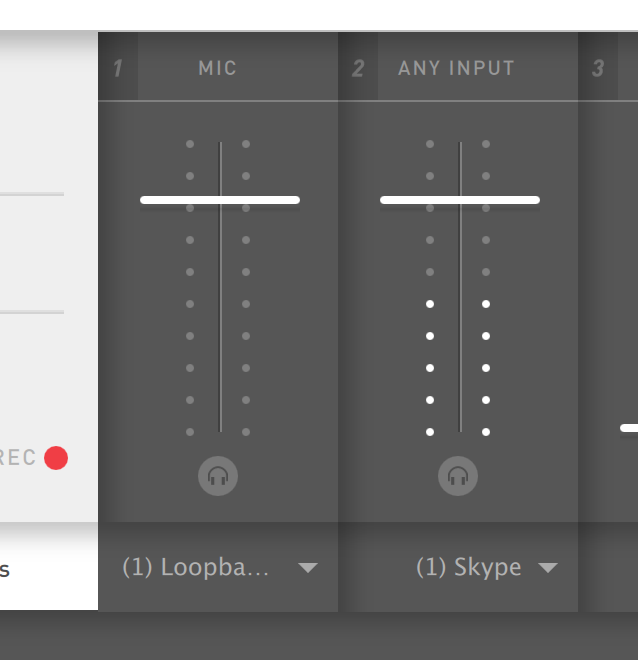
<p>On my Mac, my voice (M4 channel 1) and Discord output (M4 loopback channel 5/6) are recorded in <a href="https://rogueamoeba.com/audiohijack/">Audio Hijack</a> ($59) as WAV files, and are sent to a virtual input channel “Podcast Mix” in <a href="https://rogueamoeba.com/loopback/">Loopback</a> ($99).</p>

<figure class="image">
  <img src="/blog/img/1GfUNAOpEZF-bXe8Vqe4r8A.png" alt="" />
  <figcaption></figcaption>
</figure>

<p>When I need to play some pre-recorded audio (like a sponsor read), I connect my iPad Air to M4 channel 2, and mix it in as well.</p>

<p>The “Podcast Mix” channel is now the input channel for the streaming software <a href="https://mixlr.com/">Mixlr</a>. This way the voice of the guest and myself will be mixed and streamed over Mixlr, so I can receive realtime feedback while recording the show.</p>

<p>I ask the guests to record their end locally (Double-ender) using QuickTime Player, and send it to me after the show, so I can have the cleanest mix, without a compression artifact over Discord. I do record the Discord output as a backup on my side as well, in case a guest forgets to hit the record button, or records their voice using a wrong microphone (e.g. laptop built-in).</p>

<h4 id="post-production">Post-Production</h4>

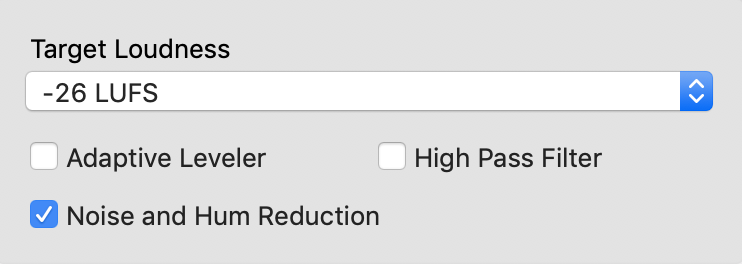
<p>First, I run the individual source audio files through <a href="https://auphonic.com/">Auphonic</a> ($89, or freemium with its cloud service) with a minimal noise reduction, and set to -26 LUFS.</p>

<figure class="image">
  <img src="/blog/img/1OPg4NDBKJMDe6SucpKMkXw.png" alt="" />
  <figcaption></figcaption>
</figure>

<p>I have some thoughts about this and have tried multiple configurations, but running Auphonic first ensures that basic noise and hum are removed, and that all files have the same loudness level. The output files will be imported to <a href="https://www.apple.com/logic-pro/">Logic Pro X</a> ($199).</p>

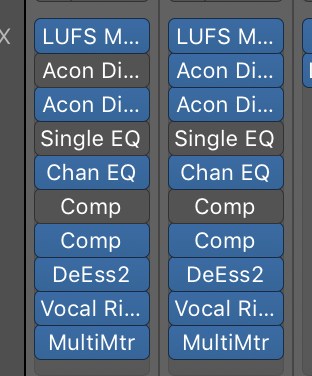
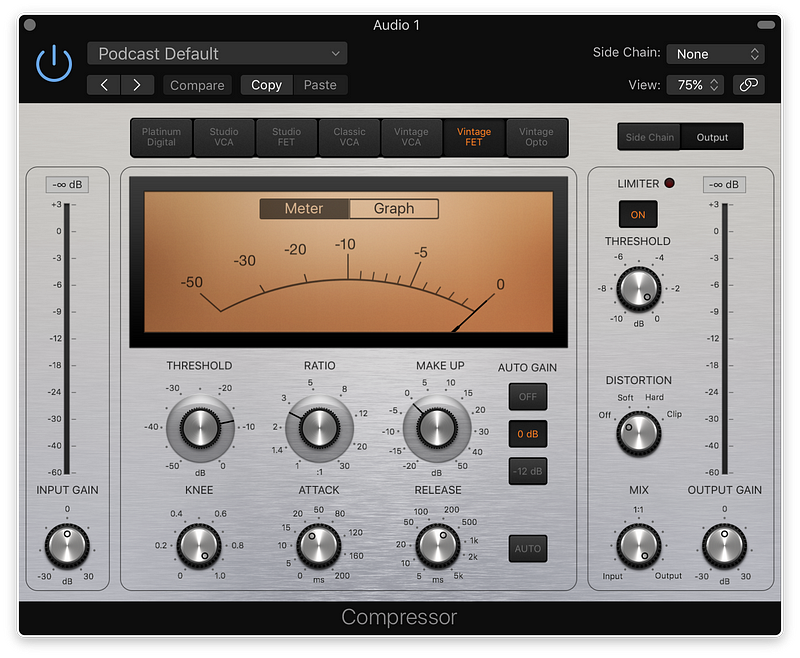
<p>I run each channel through multiple plugins, and it’s not always the same, since badly recorded audio needs more plugins to fix it. Here’s a basic list of plugins I apply:</p>

<figure class="image">
  <img src="/blog/img/1s7eO9mTIxCYDCudSwL3Ryw.png" alt="" />
  <figcaption></figcaption>
</figure>

<ul>
  <li><a href="https://acondigital.com/products/restoration-suite/">Acon Digital DeNoise</a> ($99) — Usually unused. Only applied when Auphonic is unable to remove some noise such as air conditioning, or laptop fan noises.</li>
  <li><a href="https://acondigital.com/products/deverberate/">Acon Digital DeVerberate</a> ($99) — Only applied when the guest records in a room with a lot of echo.</li>
  <li><a href="https://acondigital.com/products/restoration-suite/">Acon Digital DeClick</a> ($99) — Applied to reduce mouth clicks.</li>
  <li>Channel EQ — Cut low frequency and bump high frequency slightly to add some presence.</li>
  <li>Compressor — Very mild compressor to reduce the dynamic range.</li>
  <li>DeEss2 — Removes sibilance of the “S” sound.</li>
  <li><a href="https://www.waves.com/plugins/vocal-rider">Vocal Rider</a> ($89) — Applied to bring up the audio level for when the speaker is quiet and brings down when they’re loud, basically to level the overall loudness over time. You can achieve the similar by applying a strong compressor, but that’d usually sound too hot and unnatural.</li>
  <li>Adaptive Limiter — Applied to the master track to suppress all the peaks.
After bouncing the audio, I run the output through Auphonic again, with -19 LUFS loudness, without any audio filters. This is to ensure the audio level is the same across all of my episodes. I wish I don’t have to do this since in theory I should be able to do this in Logic Pro X alone — but I have hard time exporting the audio with the correct loudness level without some harsh limiter artifacts. (It’s very likely i’m not using the limiter correctly)</li>
</ul>

<p>I encode the audio to MP3 using <a href="https://overcast.fm/forecast">Forecast</a> (free). This is just a frontend for the <a href="https://lame.sourceforge.io/">LAME</a> (free) MP3 encoder. I use a custom <a href="https://gist.github.com/miyagawa/14b75c66f1f7d79f9f751b1b9cc7e550">Python script</a> to tag chapter information to the mp3 file, reading the list from a YAML file.</p>

<p>During the whole post-production I use the in-ear monitor earbuds to listen to the audio. Once the audio is exported to MP3, I use the <a href="https://www.apple.com/airpods-pro/">AirPods Pro</a> to ensure the levels are roughly the same among the speakers, since different headphones have different frequency response to low-pitch vs high-pitch voices.</p>

<h4 id="cheaper-alternatives-1">Cheaper Alternatives</h4>

<p>I spend a good amount of money for the post production software for editing and encoding. This is because using these tools saves a ton of my time, by throwing some money at it. None of these is strictly necessary, and you can definitely start your show with basic software like <a href="https://www.audacityteam.org/">Audacity</a>, <a href="https://www.apple.com/mac/garageband/">GarageBand</a> or <a href="https://www.wooji-juice.com/products/ferrite/">Ferrite</a> on iPad.</p>

<h3 id="summary">Summary</h3>

<p>This whole list might sound overwhelming and makes it scary to start a podcast, but this is the setup I’ve arrived after doing the podcast for 7 years. You absolutely don’t need all of this when to start a show, and can start with a minimum and make it grow over time whenever you feel like you need it.</p>

<p>Hope this is helpful to someone. Feel free to ask questions or feedback to me on Twitter.</p>]]></content><author><name>Tatsuhiko Miyagawa</name></author><summary type="html"><![CDATA[It’s been a while since the last time I wrote about my podcasting setup (link in Japanese). Although I haven’t changed most of the setup since the stability is one of the most important things, I’d like to note the current setup since it might be interesting to a future podcaster.]]></summary></entry><entry><title type="html">Linked accounts on Amazon</title><link href="https://miyagawa.co/blog/linked-accounts-on-amazon" rel="alternate" type="text/html" title="Linked accounts on Amazon" /><published>2018-06-02T00:00:00+00:00</published><updated>2018-06-02T00:00:00+00:00</updated><id>https://miyagawa.co/blog/linked-accounts-on-amazon</id><content type="html" xml:base="https://miyagawa.co/blog/linked-accounts-on-amazon"><![CDATA[<p><strong>tl;dr</strong> you have two Amazon accounts linked across different marketplaces? You’re screwed.</p>

<p>I have two Amazon accounts, one on .com and another on .co.jp using the same email address. They essentially have completely different account namespaces and there’s no problem with this.</p>

<p>I have my JP account since 2000 and the US account since 2007. Both of them are Amazon Prime accounts.</p>

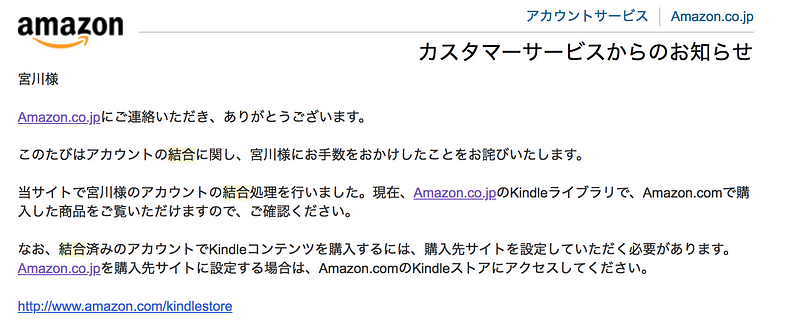
<p>Around 2012–15, when Amazon.co.jp launched Kindle for Japan, they offered the feature to link these .com and .co.jp accounts. Linking them would allow both of your accounts share the bookshelf, meaning both accounts can access each other’s digital content, while being able to switch the primary store through the UI.</p>

<p>Initially I was skeptical, but a couple of friends who have done it told me that it’s working great. I opted in for the account linking.</p>

<figure class="image">
  <img src="/blog/img/0dFmVFXLb5UIBVmnu.png" alt="" />
  <figcaption></figcaption>
</figure>

<p>This indeed has worked great. My Kindle device at the time can read books from both .com and .co.jp bookshelf, and I was able to buy new books from .co.jp using my account on the JP store.</p>

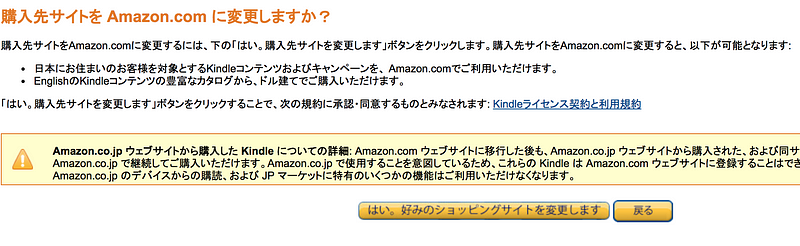
<p>To change the store to buy Kindle books from, all I need is to go to amazon.com/myk and change the preferred marketplace. For a long time, mine has been set to Japan, so that I can buy books from Japan for Kindle.</p>

<figure class="image">
  <img src="/blog/img/06-OYmcKqjQrc278n.png" alt="" />
  <figcaption></figcaption>
</figure>

<p>Now, fast forward to 2018, they have expanded the Amazon Prime and Digital Content market store to many other fields, including Amazon Music, Amazon Prime Video and Amazon Echo applications.</p>

<p>The problem is that the “Preferred Marketplace” setting above, which was originally set for Kindle, now affects how the default storefront should be for the other Amazon devices. And the setting is global and shared between the linked accounts.</p>

<p>This is what happened to me:</p>

<ul>
  <li>The Amazon Echo dot I was using suddenly stopped working with my US Amazon accounts, and the Alexa Skill I was using stopped working, because the skill is unavailable in Japan.</li>
  <li>Amazon Fire TV stick tries to connect to Prime Video Japan, and majority of the videos cannot be streamed outside Japan anyway.</li>
  <li>I bought a Kindle Fire tablet and setting up the account connects to the Japan storefront. There’s no way to watch Prime Video on Kindle Fire in my account.</li>
  <li>Trying to add my family member to Amazon Household and to share the Amazon Prime benefit (Prime 2-day free shipping) doesn’t work, because apparently the preferred store setting is shared across the Amazon Household members.
Now, all of the issues above <em>can</em> be solved by changing the Preferred store back to Amazon.com:</li>
</ul>

<figure class="image">
  <img src="/blog/img/0YpEV4Sknkbn-diAt.png" alt="" />
  <figcaption></figcaption>
</figure>

<p>This setting can be changed on the website, and I have done it in the past.</p>

<blockquote>
  <p><a href="https://twitter.com/miyagawa/status/930256141732343808"></a>The issues I had above were gone, but of course brought other problems:</p>
</blockquote>

<p>I cannot buy books from Amazon.co.jp Kindle stores anymore, and my Fire TV cannot load TV content from Japan when traveling to Japan, because now t<strong>he preferred market store setting is global and is set to the US on <em>both</em> my .com and .co.jp accounts</strong>.</p>

<p>I just wish that there is a way to unlink these two accounts, so that I can get out of this mess. One account for .co.jp, and another for .com, just like it used to be. I have tried many phone calls against Amazon customer support reps, and they have been unable to help me.</p>

<p>Amazon has stopped offering this linking account feature sometime in 2016 (well, wise for them, because this feature brings a terrible user experience), and they do not offer a way to unlink the accounts.</p>

<p>The only way out I have right now seems to be that I just cancel either of these accounts, and create a new one, to get a fresh start. But of course both of my accounts are more than 10 years old, and losing the history of purchases and digital downloads pains me a lot.</p>]]></content><author><name>Tatsuhiko Miyagawa</name></author><summary type="html"><![CDATA[tl;dr you have two Amazon accounts linked across different marketplaces? You’re screwed.]]></summary></entry><entry><title type="html">Perl Toolchain Summit 2018</title><link href="https://miyagawa.co/blog/perl-toolchain-summit-2018" rel="alternate" type="text/html" title="Perl Toolchain Summit 2018" /><published>2018-04-25T00:00:00+00:00</published><updated>2018-04-25T00:00:00+00:00</updated><id>https://miyagawa.co/blog/perl-toolchain-summit-2018</id><content type="html" xml:base="https://miyagawa.co/blog/perl-toolchain-summit-2018"><![CDATA[<p>I attended the Perl Toolchain Summit 2018 in Oslo.</p>

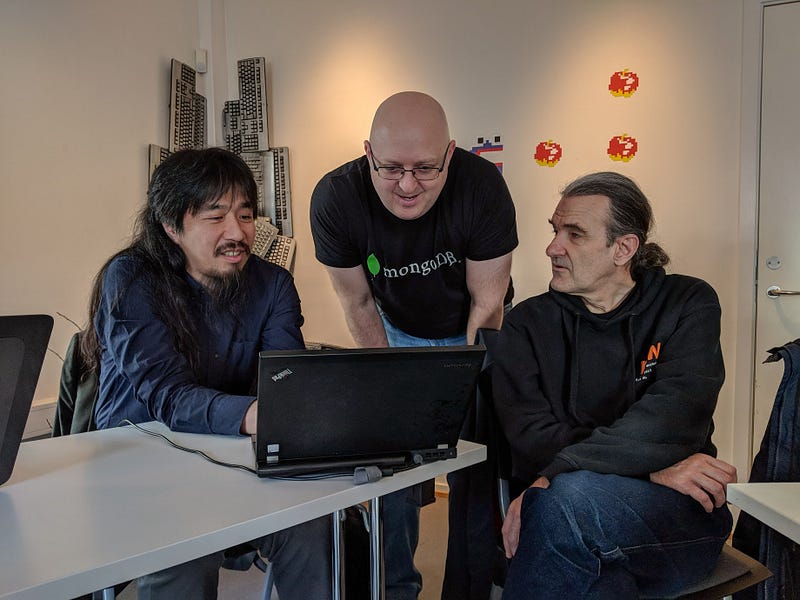
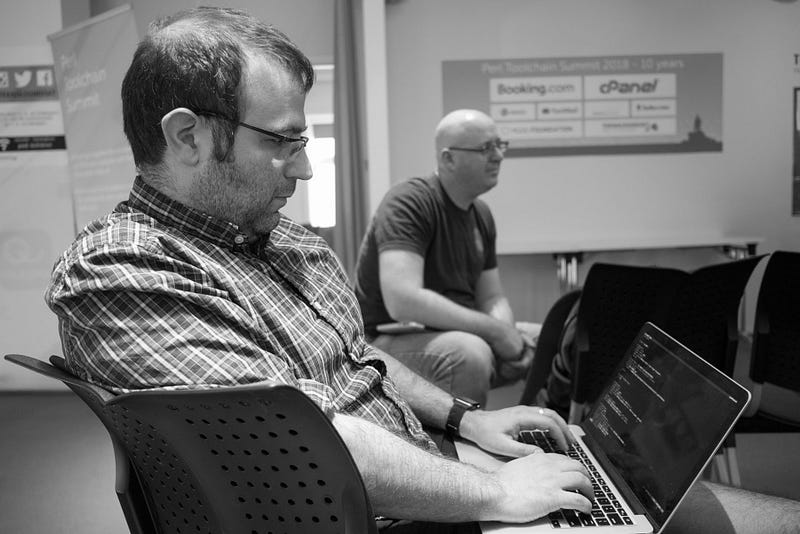
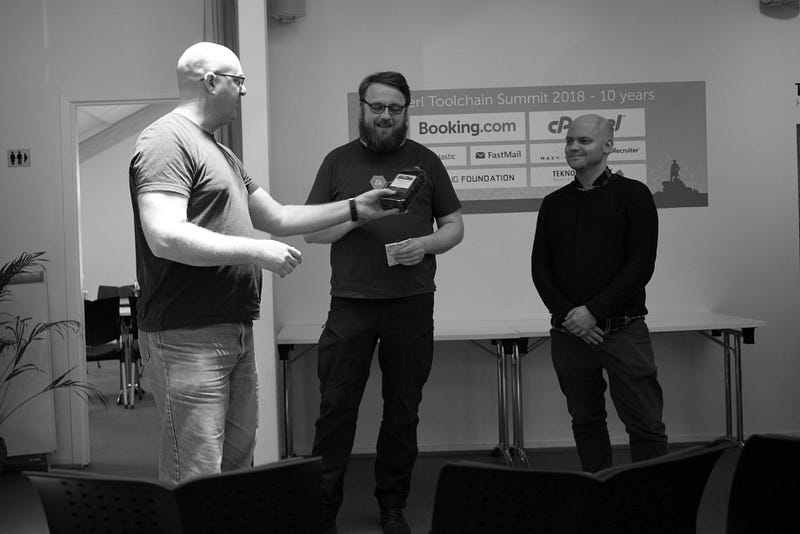
<p>It’s a unique event with lots of perl hackers who work on perl toolchain, testing tools, core support and ecosystem such as PAUSE and MetaCPAN. They annually get together and hack on these things in the same room.</p>

<h3 id="day-0-monday-to-wednesday">Day 0: Monday to Wednesday</h3>

<p>I spent a few days in Stockholm as a stop over for this trip. It’s my first time visiting both Stockholm and Oslo, and they’re both beautiful, a bit cold, expensive but really nice. I also enjoyed that the contactless payment via NFC is literally *everywhere *and it was really hard to use cash that I withdrew just as a backup. Maybe more on that in another post.</p>

<figure class="image">
  <img src="/blog/img/03bQM2BWI-Wf3D90h.jpg" alt="Viking ship museum in Oslo" />
  <figcaption>Viking ship museum in Oslo</figcaption>
</figure>

<h3 id="day-1-thursday">Day 1: Thursday</h3>

<p>I stated the day off by merging a few PRs for <a href="https://metacpan.org/release/HTTP-Tinyish">HTTP::Tinyish</a> from Shoichi Kaji (SKAJI). HTTP::Tinyish is a wrapper module to use curl, wget, LWP and HTTP::Tiny transparently with the same API. You might wonder why you would need the wrapper when you can fatpack and fall back to HTTP::Tiny anyway. This is to support TLS HTTPS requests with a stock perl which doesn’t ship with its HTTP clients that has TLS capabilities. This will be more important in the coming years as more websites will enforce TLS, although I believe PAUSE/CPAN websites will allow non-TLS requests for a while.</p>

<p>The similar code has been there in cpanm for a long time, and this is the first extract of this kind of utility modules.</p>

<p>Now, I moved onto work on outstanding pull requests and bug fixes to cpanm. At this time I was maintaining two different code base: cpanminus-1.7 (devel) branch, and Menlo 2.0 (menlo) branch.</p>

<p>They have very similar codes because one is a copy of another, and provides the same functionalities. Because they’re in different branches under the same repository, we need to apply the same changes to two different branches, or to merge from one to another, with a lot of conflicts to resolve for every merge.</p>

<p>This is obviously painful, and I decided to split the repository into two repos: miyagawa/cpanminus and miyagawa/Menlo. At the same time, I removed App::cpanminus package, and started to use Menlo::CLI::Compat from cpanm so that I don’t need to maintain two different packages for future bug fixes. (Spoiler alert: I thought this was a good idea, but turned out not to be true, more on that later)</p>

<p>I also updated cpanm’s fatpacking tool <a href="https://github.com/miyagawa/cpanminus/commit/8b8f399f8a69ae78f2c1e4859f500be2c5e7ff5d">to use Carton to get the dependencies we want</a>. Previously it was using App::FatPacker’s trace functionality, which works most of the time but is painful to make it work when your perl has unclean site_perl directory because of the side effects of loading modules from there.</p>

<p>This is so much fun of bootstrapping, that we’re building the next release of cpanm using Carton, which relies on the current release of cpanm, when you think about it.</p>

<h3 id="day-2-friday">Day 2: Friday</h3>

<p>On Friday I continued most of the release-engineering related work on Day 1.</p>

<p>First thing, the split of repositories for cpanminus and Menlo done on Day 1 now means that I have to commit, merge and release from two different repositories for every update. This is slightly annoying, and introduces a bit of confusion for contributors when opening an issue or pull request on GitHub because it’s unclear which repository it has to be fixed.</p>

<p>I quickly decided to move back Menlo to cpanminus repo, but <a href="https://github.com/miyagawa/cpanminus/pull/567">as a subdirectory</a>. Basically this makes it a monorepo with subdirectories for each distribution. It turns out that this has the best of both worlds, so that commits can be made across multiple dists at the same time, while we can release each distribution from its own directory.</p>

<p>In the afternoon I managed to implement a long-awaited feature in cpanfile: <a href="https://github.com/miyagawa/cpanminus/pull/568">‘dist’, ‘mirror’ and ‘url’ support</a>. It was once added in Carton in its 1.1 branch, but the complexity of the implementation made me abandon it.</p>

<p>This time, the patch against cpanm for this feature is really clean and simple, and I learned from the past mistakes and decided to not DWIM on the handling of these values. dist will only take CPAN dist names such as MIYAGAWA/Plack-1.000.tar.gz, while you can specify your DarkPAN URL with mirror keyword, as well as using url for just arbitrary full URL.</p>

<div class="language-perl highlighter-rouge"><div class="highlight"><pre class="highlight"><code><span class="nv">requires</span> <span class="p">'</span><span class="s1">Path::Class</span><span class="p">',</span> <span class="mf">0.26</span><span class="p">,</span>  
 <span class="s">dist</span> <span class="o">=&gt;</span> <span class="p">"</span><span class="s2">KWILLIAMS/Path-Class-0.26.tar.gz</span><span class="p">";</span>  
  
<span class="c1"># omit version specifier  </span>
<span class="nv">requires</span> <span class="p">'</span><span class="s1">Hash::MultiValue</span><span class="p">',</span>  
 <span class="s">dist</span> <span class="o">=&gt;</span> <span class="p">"</span><span class="s2">MIYAGAWA/Hash-MultiValue-0.15.tar.gz</span><span class="p">";</span>  
  
<span class="c1"># use dist + mirror  </span>
<span class="nv">requires</span> <span class="p">'</span><span class="s1">Cookie::Baker</span><span class="p">',</span>  
 <span class="s">dist</span> <span class="o">=&gt;</span> <span class="p">"</span><span class="s2">KAZEBURO/Cookie-Baker-0.08.tar.gz</span><span class="p">",</span>  
 <span class="s">mirror</span> <span class="o">=&gt;</span> <span class="p">"</span><span class="s2">http://cpan.cpantesters.org/</span><span class="p">";</span>  
  
<span class="c1"># use the full URL  </span>
<span class="nv">requires</span> <span class="p">'</span><span class="s1">Try::Tiny</span><span class="p">',</span> <span class="mf">0.28</span><span class="p">,</span>  
 <span class="s">url</span> <span class="o">=&gt;</span> <span class="p">"</span><span class="s2">http://backpan.perl.org/authors/id/E/ET/ETHER/Try-Tiny-0.28.tar.gz</span><span class="p">";</span>
</code></pre></div></div>

<p>In principle I hesitate to add this kind of new features to cpanm itself, but the argument here is that a) the patch is relatively straightforward and optional and b) users are already abusing this by specifying the URL in requires argument:</p>

<p>requires “http://host/path/Foo-Bar-1.00.tar.gz”;which, I hate to admit, accidentally works, so the feature is not really new, but is a cleaner upgrade. Also, implementing it in cpanm (or Menlo in this case) means the downstream clients such as <a href="https://metacpan.org/release/Carton">Carton</a>, <a href="https://metacpan.org/release/Carmel">Carmel</a> and <a href="https://metacpan.org/release/App-cpm">App::cpm</a> will all get this feature for free, with their ability to override it if needed.</p>

<figure class="image">
  <img src="/blog/img/0mGtNgaxWnnWviIWx.jpg" alt="PAUSE hackers" />
  <figcaption>PAUSE hackers</figcaption>
</figure>

<h3 id="day-3-saturday">Day 3: Saturday</h3>

<p>On Saturday I took a bit of break and went on a hike to the lake, which is pretty easy to do in Oslo with just a 30 minute metro ride.</p>

<figure class="image">
  <img src="/blog/img/0ubZ2gkLAFavMV4Xk.jpg" alt="" />
  <figcaption></figcaption>
</figure>

<p>In the evening I came back to the hackathon and added a support for x_use_unsafe_inc support in META.json after discussing it with ETHER, HAARG and LEONT.</p>

<p>cpanm by default adds PERL_USE_UNSAFE_INC=1when configuring, building and testing modules so that it can install distributions that have not been updated since perl 5.26 removed “.” (current directory) from the library include path.</p>

<p>Some authors want to disable this, who doesn’t want perl to load modules from an arbitrary directory after chdiring to them, to make sure their tests can reveal bugs if the module is relying on that behavior. Now, you can do that by declaring:</p>

<div class="language-plaintext highlighter-rouge"><div class="highlight"><pre class="highlight"><code>"x_use_unsafe_inc": "0"
</code></pre></div></div>
<p>This is of course opt-in and configured per distribution, and cpanm will continue to set <code class="language-plaintext highlighter-rouge">PERL_USE_UNSAFE_INC=1</code> unless otherwise set in user’s shell for different values.</p>

<h3 id="day-4-sunday">Day 4: Sunday</h3>

<p>Sunday is the last day and I should wrap up, but basically continued working on the remaining stuff, and finally fixed Win32 cmd quoting issue that has been in cpanm from day 1.</p>

<p>Essentially on Win32 you can’t rely on system() and pass arguments in a list, and you have to use modules like <a href="https://metacpan.org/release/Win32-ShellQuote">Win32::ShellQuote</a> to quote them by hand. cpanm was using its own which function to get the command path name, and added quotes in this command output. This is wrong, and could cause a double escaping issue if you pass an already quoted command to Win32::ShellQuote.</p>

<p>SKAJI has setup <a href="https://ci.appveyor.com/project/skaji/appveyor-cpanm">an AppVeyor CI repository</a> for me to test the new Menlo-based cpanm on Windows, and I was able to refactor the way we execute the shell command so that it works correctly both on UNIX and Win32, even when the command path or file names include spaces.</p>

<p>I also discussed some quick updates about <a href="https://github.com/Perl-Toolchain-Gang/cpan-static/">CPAN static installer</a> with LEONT and ETHER. The basic version of the implementation, which is essentially a port of <a href="https://metacpan.org/release/Module-Build-Tiny">Module::Build::Tiny</a>, is now in cpanm. This is also an opt-in from CPAN authors and by default cpanm will continue to configure, build and test modules using the standard tools, unless it’s explicitly stated in META.json with x_static_install: “1”</p>

<p>(Right now there’s no way to turn this feature off, but in case it blows up in some buggy distributions, we might need an option to turn this off globally)</p>

<figure class="image">
  <img src="/blog/img/0b1tCHyaFYRw0e7b-.jpg" alt="RJBS and xdg" />
  <figcaption>RJBS and xdg</figcaption>
</figure>

<h3 id="after-the-summit">After the Summit</h3>

<p>After the summit, at the hotel and the airport lounge, I continued investigating the effects of merging cpanm and Menlo. The big striking fact for me was that App::cpm uses and depends on a lot of Menlo::CLI::Compat internals. This essentially makes it difficult or nearly impossible for me to make changes or refactor the internals of Menlo, without breaking downstream clients every time.</p>

<p>Even though SKAJI agreed to patch his code whenever Menlo::CLI::Compat is updated, we decided this is not a great idea for both the maintainer (me) and downstream consumers.</p>

<p>I also know that there are gross hacks out there in the wild, who messes with cpanm internals, or parses its log files or stdout/stderr outputs because frankly there has been no other ways to extend cpanm. I would love to refactor them and make them better, but then if it breaks these users it might not be worth the hassle.</p>

<p>As of this writing, I created a third distribution, <a href="https://metacpan.org/release/Menlo-Legacy">Menlo-Legacy</a>, that contains Menlo::CLI::Compat that’s compatible to cpanm 1.7. This is something that is fatpacked into cpanm itself, and can be used by tools like Carton, Carmel or cpm. Menlo will add more features, as well as a lot of refactoring and cleanups, but then the downstream clients can continue using this legacy module, and only need to upgrade to the newer version, whenever they’re ready.</p>

<h3 id="wrap-up">Wrap Up</h3>

<blockquote>
  <p><a href="https://twitter.com/miyagawa/status/988276015603634176"></a>Working on toolchain is a hard job, since you have to support all the old versions of the software, and will be blamed and criticized for “fixing broken features” because people are relying on these broken features.</p>
</blockquote>

<p>This is why Perl Toolchain Summit is so valuable so that I can get together with these people, exchange ideas and get a great moral support.</p>

<figure class="image">
  <img src="/blog/img/0X937mJRztOKjqqY4.jpg" alt="xdg, sjn and stigo" />
  <figcaption>xdg, sjn and stigo</figcaption>
</figure>

<p>Thanks to <a href="https://www.nuugfoundation.no/en/">NUUG Foundation</a>, <a href="http://www.teknologihuset.no/">Teknologihuset</a>, <a href="https://www.booking.com/">Booking.com</a>, <a href="https://cpanel.com/">cPanel</a>, <a href="https://www.fastmail.com/">FastMail</a>, <a href="https://www.elastic.co/">Elastic</a>, <a href="https://www.ziprecruiter.com/">ZipRecruiter</a>, <a href="https://www.maxmind.com/en/home">MaxMind</a>, <a href="https://www.mongodb.com/">MongoDB</a>, <a href="https://www.surevoip.co.uk/">SureVoIP</a>,<a href="https://www.campusexplorer.com/">Campus Explorer</a>, <a href="https://www.bytemark.co.uk/">Bytemark</a>, <a href="https://www.iinteractive.com/">Infinity Interactive</a>, <a href="http://opusvl.com/">OpusVL</a>, <a href="https://eligo.co.uk/">Eligo</a>, <a href="https://www.perl-services.de/">Perl Services</a>, <a href="https://www.oetiker.ch/">Oetiker+Partner</a> for sponsoring, and sjn &amp; stigo for organizing the great event.</p>]]></content><author><name>Tatsuhiko Miyagawa</name></author><summary type="html"><![CDATA[I attended the Perl Toolchain Summit 2018 in Oslo.]]></summary></entry><entry><title type="html">Google Pixel Experience</title><link href="https://miyagawa.co/blog/google-pixel-experience" rel="alternate" type="text/html" title="Google Pixel Experience" /><published>2017-05-15T00:00:00+00:00</published><updated>2017-05-15T00:00:00+00:00</updated><id>https://miyagawa.co/blog/google-pixel-experience</id><content type="html" xml:base="https://miyagawa.co/blog/google-pixel-experience"><![CDATA[<p>If you follow me on Twitter, you have been seeing a lot of my anger tweets against Google on how incapable they are on fixing my broken Pixel phone. If it were with a manufacturer with a better customer support, i.e. Apple, it would have been a walk to the nearest Apple Store and get a replacement phone immediately.</p>

<p>Here’s what’s been happening so far:</p>

<ul>
  <li>2016/10/04 Ordered a Google Pixel</li>
  <li>2016/10/21 Received the device</li>
  <li>2017/02/20? Installed Android N public beta program</li>
  <li>2017/02/23 <a href="https://twitter.com/miyagawa/status/834799208464932865">Noticed that the device freezes, crashes or reboots randomly</a> but it was not so frequent as to bother me</li>
  <li>2017/04/24 <a href="https://twitter.com/miyagawa/status/856757203830685696">The freeze is now more common, a couple of times a day</a></li>
  <li>2017/04/28 Factory reset the phone, thinking the public beta is the cause for freezes</li>
  <li>2017/05/02 <a href="https://twitter.com/miyagawa/status/859397175171624960">Reset did not fix the freeze issue</a></li>
  <li>2017/05/02 Contacted Google from the Pixel web support form. I was told that Google support would contact me in 48 hours.</li>
  <li>2017/05/04 They did not contact me in 48 hours. I opened another support contact, this time via Pixel’s on-screen help menu. Got an immediate support and a link to order a replacement.</li>
  <li>2017/05/05 The replacement phone is shipped with FedEx 2-day.</li>
  <li>2017/05/08 I was working from home waiting for the delivery, but FedEx posted a “Delivery Exception”. Given that I needed to go on a trip on the next day, I called FedEx so that they can hold the phone at the shipping center so I can pick up. It was denied because the shipper (Google) doesn’t allow holding the item at the shipping center. Contacted Google to allow it, but they could not.</li>
  <li>2017/05/09 Because I do not want to leave the phone package while I’m away, I put a note for FedEx to return the item, also to Google to cancel the shipment.</li>
  <li>2017/05/11 The item was successfully sent back to the Google warehouse.</li>
  <li>2017/05/13 I sent an email to Google customer support to send me a new link to order a replacement phone, this time to my office so that I can pick up when I’m back.</li>
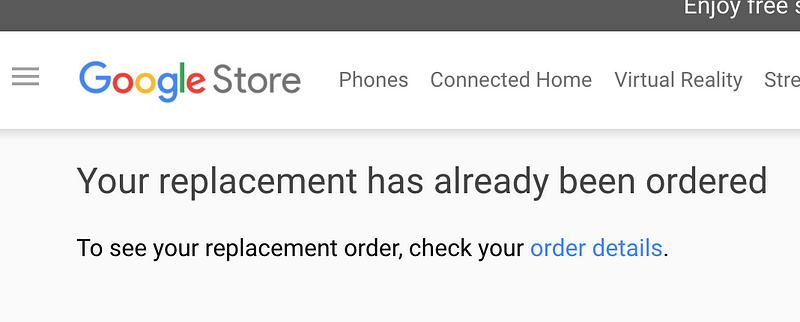
  <li>2017/05/14 Google sent me a new link. The new link does not work, saying “Your replacement has already been ordered.” Contacted Google to fix the issue.</li>
  <li>2017/05/15 Google sent me back “Try it with an incognito window.” It does not work either, with the same error.</li>
</ul>
<figure class="image">
  <img src="/blog/img/1IMKpb1fOCsz3qxHyTzRtPQ.png" alt="" />
  <figcaption></figcaption>
</figure>

<p>So I am about 2 weeks since the first contact with Google to get a replacement for this unstable phone, and still haven’t got one, let alone order a new replacement.</p>

<p>Obviously, a phone that freezes randomly is a major inconvenience. I failed to transfer the trains because Google Maps freeze, or failed to take a good picture opportunity because the camera app crashes.</p>

<p>Google Pixel is a great phone and <a href="https://miyagawa.co/blog/google-pixel-review">I loved it</a>, but once it gets broken, their customer support experience is a hell.</p>

<p>**Update: **They finally figured out how to cancel the first RMA and have issued a new order link for me, and I received the new replacement phone on May 18. The new phone works great and there’s no freeze so far.</p>]]></content><author><name>Tatsuhiko Miyagawa</name></author><summary type="html"><![CDATA[If you follow me on Twitter, you have been seeing a lot of my anger tweets against Google on how incapable they are on fixing my broken Pixel phone. If it were with a manufacturer with a better customer support, i.e. Apple, it would have been a walk to the nearest Apple Store and get a replacement phone immediately.]]></summary></entry><entry><title type="html">Podcasting Guide 2017</title><link href="https://miyagawa.co/blog/podcasting-guide-2017" rel="alternate" type="text/html" title="Podcasting Guide 2017" /><published>2017-01-22T00:00:00+00:00</published><updated>2017-01-22T00:00:00+00:00</updated><id>https://miyagawa.co/blog/podcasting-guide-2017</id><content type="html" xml:base="https://miyagawa.co/blog/podcasting-guide-2017"><![CDATA[<p>毎年記録しているポッドキャスト収録環境のまとめ。<a href="https://miyagawa.co/blog/podcasting-setup-2016#.az47ym7zv">2016年のスナップショット</a>からあまり変更がないので、これから収録する人のレベルにあわせたおすすめのアイテムを項目ごとにまとめてみようと思う。</p>

<h2 id="はじめに">はじめに</h2>

<p>この記事に書いてあるのは、自分が <a href="http://rebuild.fm/">Rebuild</a> でこの4年間利用してきたものを中心にしている。すべての人にあてはまるものではもちろんないし、日本では手に入りにくい機材なんかも紹介している。また、基本的には毎週、何人かの（レギュラーではない）ゲストと遠隔で収録するというスタイルなので、そうでない場合には参考にならないかもしれない。</p>

<p>項目の多さや、使用しているツールの価格など、「ここまでこだわることはないだろう」という印象を受ける人も多いかもしれない。もちろんそれは正しいのだが、言いたいことはむしろ逆である。良い機材やツールを利用すれば、その分、<strong>手間をかけずに</strong>、より聴きやすいエピソードを<strong>効率よく</strong>配信することができるようになる。</p>

<p>大きく分けて、マイク編、レコーディング編、ポストプロダクション編、ストリーミング編としてみた。収録スタイルやポリシーによっては必要のないセクションもあると思うので、適宜読み飛ばしてもらいたい。</p>

<h2 id="マイク編">マイク編</h2>

<figure class="image">
  <img src="/blog/img/10c9Nkl1f8xESY5YoGTdYpQ.png" alt="" />
  <figcaption></figcaption>
</figure>

<p>アナログマイク、XLR ケーブル、USB インターフェース</p>
<h3 id="usb-ダイナミックマイク">USB ダイナミックマイク</h3>

<p>とりあえずはじめる、という意味で入門用マイクにおすすめしたいのは、Samson Q2U もしくは Audio-Technica ATR-2100。この2つ以外でまともに使えるダイナミック型の USB マイクは見たことがない。</p>

<p><a href="http://product.rakuten.co.jp/product/-/cbdf690fa2cac98dc65797c630d603aa/" title="http://product.rakuten.co.jp/product/-/cbdf690fa2cac98dc65797c630d603aa/"><strong>【楽天市場】SAMSON Q2U | 価格比較 - 商品価格ナビ</strong><br />
<em>SAMSON Q2Uの価格比較、最安値比較。【最安値 8,110円（税込）】【評価：4.00】【口コミ：2件】（1/23時点 - 商品価格ナビ）</em>product.rakuten.co.jp</a><a href="http://product.rakuten.co.jp/product/-/cbdf690fa2cac98dc65797c630d603aa/"></a><a href="https://www.amazon.com/Audio-Technica-ATR2100-USB-Cardioid-Dynamic-Microphone/dp/B004QJOZS4/" title="https://www.amazon.com/Audio-Technica-ATR2100-USB-Cardioid-Dynamic-Microphone/dp/B004QJOZS4/"><strong>Audio-Technica ATR2100-USB Cardioid Dynamic USB/XLR Microphone</strong><br />
<em>Edit description</em>www.amazon.com</a><a href="https://www.amazon.com/Audio-Technica-ATR2100-USB-Cardioid-Dynamic-Microphone/dp/B004QJOZS4/"></a>どちらのマイクも USB のダイナミックマイクで、XLR 端子もついているため、後々 XLR ベースのセットアップに移行する際にもそのまま使用することができる。また両方を同時につかうこともできるので、USB で Mac につないで Skype に流し、 XLR からポータブルレコーダーに入れて手元で録音し、というような変態的な利用方法も可能だ。</p>

<p>ダイナミック型とコンデンサ型の違いは、一口にいってしまうと、コンデンサ型のほうが感度が強く、よりきめ細やかな音を再現できるということになる。ポッドキャストでは、収録環境のファンノイズや、エアコンの音、部屋の物音などを拾ってしまう可能性も大きく、<strong>ダイナミックマイクのほうが無難</strong>と言っていいだろう。</p>

<p>オーディオテクニカは日本の会社のはずだが、ATR2100 は日本での取扱がないので、ほぼ同等の Q2U を紹介しておく。みた感じほとんど同じ製品で、どちらかのOEM ではないか？と思われるほど。かなりポップ音 (パ、バ、タ行の破裂音）に弱いので、マイクカバーをつけるのをおすすめする。</p>

<p>このマイクを使用しているゲスト: <a href="http://rebuild.fm/people/hak">hak</a>, <a href="http://rebuild.fm/people/N">N</a>, <a href="http://rebuild.fm/people/higepon">higepon</a></p>

<h3 id="usb-コンデンサマイク">USB コンデンサマイク</h3>

<p>その他の理由で、コンデンサマイクやヘッドセットを使いたい場合は、Blue の Yeti やサンワサプライのヘッドセットを紹介しておく。</p>

<p><a href="https://www.amazon.co.jp/Blue-Micro-Yeti-2-0%E3%83%9E%E3%82%A4%E3%82%AF-15374/dp/B002VA464S/?tag=bulknews-22" title="https://www.amazon.co.jp/Blue-Micro-Yeti-2-0%E3%83%9E%E3%82%A4%E3%82%AF-15374/dp/B002VA464S/?tag=bulknews-22"><strong>Blue Micro Yeti USB 2.0マイク 15374</strong><br />
<em>PC用マイクをお探しなら低価格・豊富な品ぞろえのAmazon.co.jpで、Blue Micro Yeti USB 2.0マイク 15374を通販でいつでもお安く。アマゾン配送商品なら通常配送無料（一部除く）。</em>www.amazon.co.jp</a><a href="https://www.amazon.co.jp/Blue-Micro-Yeti-2-0%E3%83%9E%E3%82%A4%E3%82%AF-15374/dp/B002VA464S/?tag=bulknews-22"></a>コンデンサタイプは部屋の騒音を拾いやすいほか、Yeti は構造上、マイクを置いたテーブルの音をかなり大きく拾うため（キーボードの打鍵音など）、注意が必要だ。</p>

<p>このマイクを使用しているゲスト: <a href="http://rebuild.fm/people/naoya">naoya</a></p>

<p><a href="https://www.amazon.co.jp/dp/B00I3VWQIW/?tag=bulknews-22" title="https://www.amazon.co.jp/dp/B00I3VWQIW/?tag=bulknews-22"><strong>サンワサプライ USBヘッドセット/ヘッドホン ホワイト MMZ-HSUSB10W</strong><br />
<em>PC用ヘッドセットをお探しなら低価格・豊富な品ぞろえのAmazon.co.jpで、サンワサプライ USBヘッドセット/ヘッドホン ホワイト MMZ-HSUSB10Wを通販でいつでもお安く。アマゾン配送商品なら通常配送無料（一部除く）。</em>www.amazon.co.jp</a><a href="https://www.amazon.co.jp/dp/B00I3VWQIW/?tag=bulknews-22"></a>ヘッドセットタイプの場合、マイクとヘッドフォンが原理上つながっているため、ヘッドフォンから漏れ出た相手方の音を拾いやすく、後述するダブルエンダー式のローカル録音をする場合は注意が必要。</p>

<p>このマイクを使用しているゲスト: <a href="http://rebuild.fm/people/typester">typester</a>, <a href="http://rebuild.fm/people/matz">Matz</a>, <a href="http://rebuild.fm/people/kazuho">kazuho</a></p>

<h3 id="xlr-マイク">XLR マイク</h3>

<p>XLR マイクを使うと、多様なマイクから選ぶことができ、USB インタフェースで自分の声をモニターしたり、ポータブルレコーダーでオフライン収録をするなど、応用範囲が広くなる。PC に入力するには別途 USB インタフェースが必要になるため、気軽にはじめるというのには向かないが、ある程度軌道に乗ってきたら、検討してみても良いだろう。</p>

<p>2014–15年ごろは、手元の収録環境として、ダイナミックマイクの XLR マイク Shure BETA 57A を利用していた。</p>

<p><a href="http://www.shure.com/americas/products/microphones/beta/beta-57a-instrument-microphone" title="http://www.shure.com/americas/products/microphones/beta/beta-57a-instrument-microphone"><strong>BETA 57A</strong><br />
<em>Excellent microphone designed for use with amplified or acoustic instruments. Compact grille design.</em>www.shure.com</a><a href="http://www.shure.com/americas/products/microphones/beta/beta-57a-instrument-microphone"></a>もちろん、悪くないマイクだが、ダイナミックの特性ということもあってか、中音域がこもりがちになる。またマイクの感度が低い（ダイナミックマイク全般の特長）ため、インタフェースのゲインを最大まで上げないと PC で使える音にならず、そのためにラインノイズが増えるというところも気になっていた。</p>

<p>そこで、現在は <a href="http://atp.fm">Accidental Tech Podcast</a> でおなじみ Marco の <a href="https://marco.org/podcasting-microphones">Podcast Microphones Guide</a> で紹介されていた BETA 87A を使っている。</p>

<p><a href="http://www.shure.com/americas/products/microphones/beta/beta-87a-vocal-microphone" title="http://www.shure.com/americas/products/microphones/beta/beta-87a-vocal-microphone"><strong>BETA 87A</strong><br />
<em>For studio-quality sound in live performance, a smooth, tailored response for warm, accurate sound.</em>www.shure.com</a><a href="http://www.shure.com/americas/products/microphones/beta/beta-87a-vocal-microphone"></a>57A とは異なり、コンデンサ型のマイクだが、hyper cardioid というピックアップパターンなので、ほとんど部屋の騒音を拾わない。また収録自体はクローゼットで行っているため、元から騒音も反響もないというところが重要ではある。</p>

<p>最終的にミックスダウンするとあまり違いがわからない程度ともいえるが、ここ1年ぐらいの自分の声は、よりクリアになったんじゃないかな、とは感じている。</p>

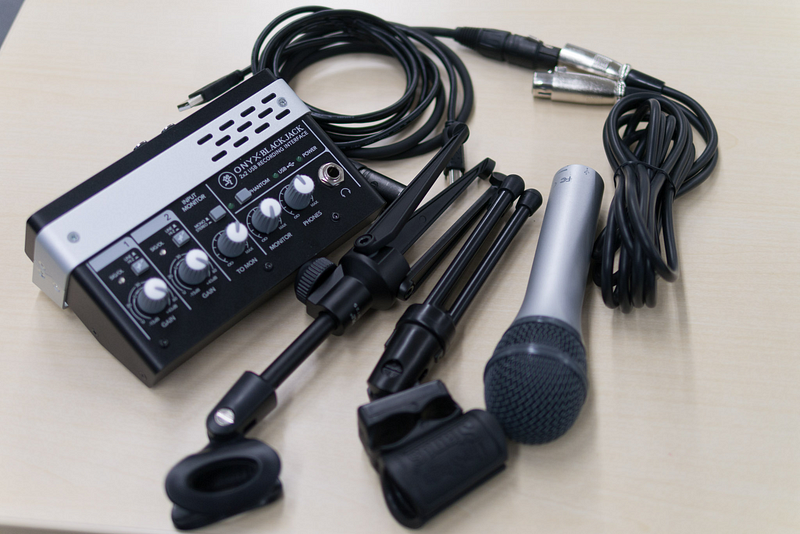
<p>コンデンサマイクではファンタム電源が必要なので、USB インタフェース Mackie Onyx Blackjack から供給している:</p>

<p><a href="https://www.amazon.co.jp/MACKIE-USB%E3%82%AA%E3%83%BC%E3%83%87%E3%82%A3%E3%82%AA%E3%82%A4%E3%83%B3%E3%82%BF%E3%83%BC%E3%83%95%E3%82%A7%E3%82%A4%E3%82%B9-Onyx-Blackjack-%E5%9B%BD%E5%86%85%E6%AD%A3%E8%A6%8F%E5%93%81/dp/B003VZG550/?tag=bulknews-22" title="https://www.amazon.co.jp/MACKIE-USB%E3%82%AA%E3%83%BC%E3%83%87%E3%82%A3%E3%82%AA%E3%82%A4%E3%83%B3%E3%82%BF%E3%83%BC%E3%83%95%E3%82%A7%E3%82%A4%E3%82%B9-Onyx-Blackjack-%E5%9B%BD%E5%86%85%E6%AD%A3%E8%A6%8F%E5%93%81/dp/B003VZG550/?tag=bulknews-22"><strong>MACKIE マッキー 2×2 USBオーディオインターフェイス Onyx Blackjack 国内正規品</strong><br />
<em>オンライン通販のAmazon公式サイトなら、MACKIE マッキー 2×2 USBオーディオインターフェイス Onyx Blackjack 国内正規品を 楽器・音響機器ストアで、いつでもお安く。当日お急ぎ便対象商品は、当日お届け可能で…</em>www.amazon.co.jp</a><a href="https://www.amazon.co.jp/MACKIE-USB%E3%82%AA%E3%83%BC%E3%83%87%E3%82%A3%E3%82%AA%E3%82%A4%E3%83%B3%E3%82%BF%E3%83%BC%E3%83%95%E3%82%A7%E3%82%A4%E3%82%B9-Onyx-Blackjack-%E5%9B%BD%E5%86%85%E6%AD%A3%E8%A6%8F%E5%93%81/dp/B003VZG550/?tag=bulknews-22"></a>他にも $150 前後で購入できる USB インタフェースはたくさんある。Six Colors のサイトに<a href="https://sixcolors.com/post/2016/04/low-cost-usb-audio-interfaces-review-cheap-xlr/">レビュー</a>があるので、参考まで。</p>

<h2 id="レコーディング編">レコーディング編</h2>

<p>ポッドキャストを収録するには、リモートでインタビューする方式と、実際に会って収録する方法がある。持っている機材や住んでいる場所によってどちらを選ぶかは変わってくるが、大まかにいうと以下のようになる。</p>

<ul>
  <li>リモート: Skype などで会話を行い、それを収録する。Skype の音を直接録音するか、お互いの手元でローカル録音したものをマージする（ダブルエンダー）。毎度違うゲストで行う場合、マイク機材や、インターネット環境などで不具合が起こることが多い。</li>
  <li>ローカル: 実際に会って、ポータブルレコーダーなどで収録する。場所や時間の制約を受けるが、ネットワークや機材セットアップのトラブルが少ない。</li>
</ul>

<h4 id="skype-録音">Skype 録音</h4>

<p>オンラインで収録するには多くのネットワーク通話ソフトが利用できるが、2017 年現在、もっとも安定して利用できるソフトは依然として Skype であり、Skype のアカウントを持っていないという人はほとんどいない。より低レイテンシを求めるなら <a href="https://discordapp.com/">Discord</a>, またポッドキャストに特化したローカル録音も可能なサービスとして <a href="https://zencastr.com/">Zencastr</a> なども出てきているが、この記事では Skype を前提として書いていく。</p>

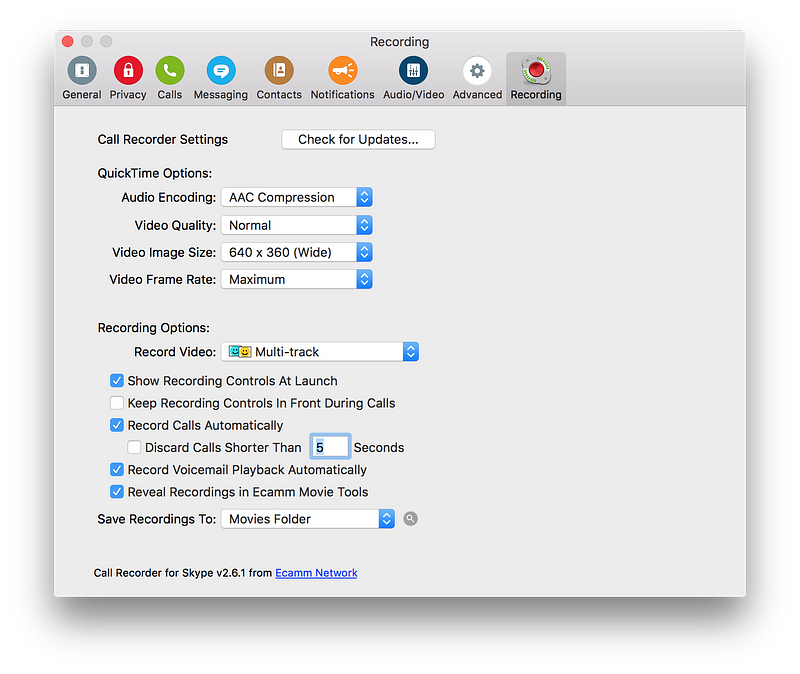
<p>Skype の録音をそのまま収録するソフトウェアとして紹介したいのが eCamm call recorder だ。</p>

<p><a href="http://www.ecamm.com/mac/callrecorder/" title="http://www.ecamm.com/mac/callrecorder/"><strong>Call Recorder for Skype</strong><br />
<em>Record Mac Skype Calls - Automatically record and save call audio and video on your Mac.</em>www.ecamm.com</a><a href="http://www.ecamm.com/mac/callrecorder/"></a></p>

<figure class="image">
  <img src="/blog/img/1FwjQh_2uiB6UocvnSQq83w.png" alt="" />
  <figcaption></figcaption>
</figure>

<p>Call Recorder For Skype簡単なUIで、通話を録音することができる。自分側の音声はローカルで、相手側の音声は Skype からのものとなり、別途提供されるツールで、<strong>別トラックに書き出すことも可能</strong>。ただしゲストが複数人いる場合、その複数人はまとめて1トラックとなる。</p>

<p>Skype での音声は、ネットワーク環境によっては強くコンプレッションがかかったものになりがちだが、コンプレッサーとしては優秀な部類のため、聴くに堪えないほどではないのも事実。</p>

<h3 id="ローカル録音-ダブルエンダー">ローカル録音 (ダブルエンダー)</h3>

<p>Rebuild で行っているのが、ダブルエンダーと呼ばれる録音方式。何のことはない、QuickTime や Audacity などのツールで、相手側でも録音を行ってもらい、自分で録音したトラックとマージする方式である。</p>

<p>Skype を経由しないため、ネットワークでのディレイやコンプレッションにまったく影響されない音質で録音することができる。ただし注意が必要な点として、</p>

<ul>
  <li>音漏れのしないクローズ型ヘッドフォン、もしくはカナル型イヤフォンを使用すること。そうでない場合、ヘッドフォンから漏れた相手側の音声を拾ってしまう。</li>
  <li>長時間の配信を録音すると<strong>必ずどこかでドリフト（音ズレ）が起こる</strong>。それぞれのハードウェアクロックが完全に一致せず、また収録中のCPU負荷などによってバッファがずれることによっても起こる。同一世代の Macbook Pro などでも2時間の配信で 1–2 秒はずれることがほとんど。</li>
  <li>QuickTime Player で録音する場合、「入力ソース」が正しく USB マイクなどになっていることを確認する。デフォルトで「内蔵マイク」となっていることが多い。
音ズレに関しては、前項目の Skype 録音をバックアップとしてとっておき、それをマスターとして音合わせをするという手段が有効。ただ、頭を合わせても、だんだんずれていく、ということは必ず起こるので、無音部分で調整することが必要になる。</li>
</ul>

<p>そもそも収録した内容をあまり編集しない、また Skype の音質で問題がない、というのであれば、Skype の録音をマスターにするのでもよい。どちらも同じソースから録音されているのでドリフトがおこることは原理上ない。</p>

<h3 id="ローカル収録">ローカル収録</h3>

<p>Rebuild でローカル収録の際に利用している機材は以下の通り:</p>

<ul>
  <li>レコーダー: Zoom H5 + EXH-6</li>
  <li>マイク: Shure BETA 57A, BETA 87A, Audio Technica ATR-2100</li>
  <li>アナログ USB 変換: <a href="https://www.amazon.co.jp/BEHRINGER-UCA202/dp/B000KW2YEI/?tag=bulknews-22">UCA-202</a> (モニタ出力を Mac につないでストリーミング入力に)
実際に会って録音するには、人数分の XLR/アナログマイクと、ポータブルレコーダーを用意するのが簡単だ。</li>
</ul>

<p><a href="https://www.zoom.co.jp/ja/products/handy-recorder/h5-handy-recorder" title="https://www.zoom.co.jp/ja/products/handy-recorder/h5-handy-recorder"><strong>H5 Handy Recorder</strong><br />
<em>クリエイターのニーズに応じて、常に進化を遂げてきたZOOMのハンディレコーダー。その伝統は、最新モデルの『H5』にも息づいています。 内蔵ステレオマイクと２系統の外部入力を組み合わせた、最大4トラックの同時録音機能。140dB …</em>www.zoom.co.jp</a><a href="https://www.zoom.co.jp/ja/products/handy-recorder/h5-handy-recorder"></a>Zoom の H5 は、2チャンネルXLR入力が用意されていて、オプションのモジュールでさらに 2チャンネル追加することができる。録音は SD カードに保存することができ、複数のモニタリング出力を使って、収録しながらライブストリームのためのソース入力にする、といったこともできる。</p>

<figure class="image">
  <img src="/blog/img/1mTOk-1TFQvDxH-Wa0KB7pg.png" alt="" />
  <figcaption></figcaption>
</figure>

<p><a href="https://www.zoom.co.jp/ja/products/field-video-recording/field-recording/h6-handy-recorder" title="https://www.zoom.co.jp/ja/products/field-video-recording/field-recording/h6-handy-recorder"><strong>Zoom H6 Handy Recorder</strong><br />
<em>別売オプションのデュアルXLR／TRSカプセル『EXH-6』を装着すれば、『H6』が合計6系統のマイク／ライン信号を入力できるマルチトラック・レコーダーに早変わり。ボーカル、ドラム、ベース、ギターなど、各楽器を個別のトラックに録音して、…</em>www.zoom.co.jp</a><a href="https://www.zoom.co.jp/ja/products/field-video-recording/field-recording/h6-handy-recorder"></a>最初から3人以上での録音を視野にいれるなら、上位モデルの H6 でもよいだろう。ただその分、サイズやバッテリー容量なども大きくなってしまう。</p>

<p>ローカル収録する際は、相互のチャンネルに相手の声も拾ってしまうため、Skype で別トラックで録音した場合と同じように編集するのは困難となる。よって、反響の大きくない部屋で収録することが重要になるし、また<strong>一方が話している際にむやみに相槌を打たない</strong>、などに気をつける必要がある（とくに日本人は1–1の会話でやたらと相槌を打つくせがある人が多く、ポッドキャストでは過剰な相槌は聴いていて不快になるので、意識してしないようにすることが重要）。</p>

<h2 id="ポストプロダクション編">ポストプロダクション編</h2>

<p>収録が終わったら、それを配信できる形にまで持っていくのがポストプロダクション作業だ。ここにどの程度の手間や時間をかけるのかは、完全にポッドキャストの運営ポリシーによって異なってくる。</p>

<ul>
  <li>録って出し: 収録したものを無編集で配信する。手間はもっともかからないが、ソースレベルである程度のクオリティのものが収録できることが前提となる。</li>
  <li>編集: ダブルエンダー方式で録音したソースをDAWソフト (GarageBand, Logic Pro X など) に取り込み、音声加工や編集を行い、聴きやすいものにする。
上記の2つの間でバランスをとっていくことになるだろう。録って出しするにしても、収録時のネットワークトラブルなどによる無音部分などはカットするのが基本だ。</li>
</ul>

<p>Rebuild では、<a href="https://rebuild.fm/supporter">サポータープログラム</a>向けの RAW データ配信は上記の録って出しが近い。ストリーミング時に録音したローカル録音と Skype 録音をレベル調整しただけのデータをMP3にエンコードして配信している。</p>

<p>それに対し、ポッドキャストフィードで配信されるアーカイブ版は、より聞きやすくなるようにミックスを行っている。開始当初に比べると、内容を編集したりカットしたりという部分は殆どないので、主にオーディオ面でのエフェクトや、過剰な無音部分のカットなどが中心となる。</p>

<h3 id="logic-pro-x">Logic Pro X</h3>

<p>ポッドキャスト編集に必要なソフトウェアは、マルチトラックで編集ができる DAW であればなんでもよい。フリーで入手できるソフトとしては Audacity や GarageBand などがある。</p>

<p><a href="http://www.apple.com/logic-pro/" title="http://www.apple.com/logic-pro/"><strong>Logic Pro X - Music production. Cranked up to X.</strong><br />
<em>Logic Pro X brings Touch Bar support and other powerful new tools to the studio. In a more modern interface.</em>www.apple.com</a><a href="http://www.apple.com/logic-pro/"></a>Logic Pro X は $200 と、決して安くはないソフトウェアだが、使いやすくカスタマイズ可能なキーボードショートカットや、無音部分を自動でカットする “Strip Silence”、多彩なプラグインなど、ポストプロダクション作業を大いに効率化してくれるソフトウェアだ。</p>

<p>必ず使用しているエフェクト、プラグインは以下の通り:</p>

<ul>
  <li><a href="https://acondigital.com/products/restoration-suite/">Acon Restoration Suite</a>: アンビエントやホワイトノイズを軽減するのに使用。Audacity にも同等な機能がある</li>
  <li>Linear EQ: ほとんどのマイクでは低音部は必要がないので大きくカット、また 1000Hz 前後の中音部もこもる原因となるので小さく下げる</li>
  <li><a href="https://www.klangfreund.com/lufsmeter/">LUFS Meter</a>: 入力のラウドネスをそろえるのに使用。Normalizer などでも代用可</li>
  <li>Compressor: ほとんどの場合、話者の会話レベルが一定とはならないので、音の粒を揃えるのに必須</li>
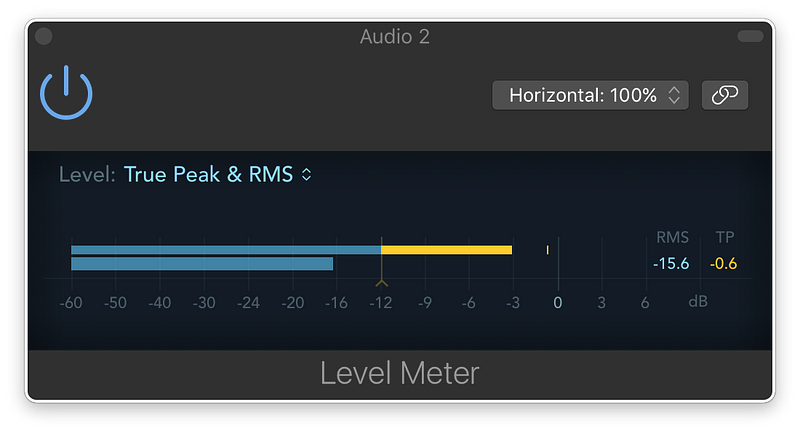
  <li>Level Meter: 最終的なレベルがどの程度になっているかを確認する。True Peak が-6~-3db, RMS で -20–16 程度が理想的だが、後述する Leveler で調整するのであまり神経質にはしない。</li>
</ul>
<figure class="image">
  <img src="/blog/img/1-4_0K_Si-5qaoQqBXGyZSA.png" alt="" />
  <figcaption></figcaption>
</figure>

<figure class="image">
  <img src="/blog/img/1kbw45EGGvFsh1lCOZvJu6g.png" alt="" />
  <figcaption></figcaption>
</figure>

<p>Logic を使用しない場合 (GarageBand, Audacity など) でも、ノーマライザとコンプレッサーを正しく使用することで、音量バランスをかなり改善することが可能となる。</p>

<p>ノイズの軽減については、かならず Noise <em>Reduction</em> 系のプラグインを利用し、<strong>Noise <em>Gate</em> を利用しないこと</strong>。Gate の場合、会話していない場所を完全に無音にしてしまうため、静かな環境で聴いていると、ノイズが出たり入ったりの状態になって、かえって聴きづらくなってしまう。</p>

<p>オプションとしてかけているプラグインとしては、</p>

<ul>
  <li><a href="https://acondigital.com/products/restoration-suite/">Acon Declick</a>: 音声がクリッピング (ゲイン過多) している場合や、リップノイズが気になる場合に、クリック音を軽減</li>
  <li>De-Esser: サ行の音が強いときに</li>
  <li><a href="https://acondigital.com/products/deverberate/">Acon Deverberate</a>: 反響（リバーブ）の大きい部屋で録音された場合にそれを打ち消す
どれもVSTプラグインのため、かけるとエクスポートに多少の時間がかかるようになる。また、プラグインをかけすぎると元の音声とかけ離れたものになったり、そもそも聴きづらくなることがほとんど。本当に必要なときにだけかけるようにする。</li>
</ul>

<p>実際のポストプロダクション作業については以前に動画にしたことがあるので、参考にしてもらいたい。大きく内容を編集することはないが、全体を通して微調整をするので、収録の実時間＋αの時間はどうしてもかかってしまう。</p>

<h3 id="adaptive-leveler">Adaptive Leveler</h3>

<p>前述のコンプレッサーでトラック内のピークを揃えることはできるが、全体を通して音量の大きな箇所と小さな箇所の差分をなくしていくのが Leveler というエフェクトになる。これは最後の最適化なので、やらなくてもよい。</p>

<p>Logic Pro X 内でも同等の処理をするプラグインが存在するが、Rebuild のマスタリングでは別途 Auphonic というソフトウェアを使っている。</p>

<p><a href="https://auphonic.com/audio_examples" title="https://auphonic.com/audio_examples"><strong>Auphonic Audio Examples</strong><br />
<em>The automatic audio post production webservice, using signal processing and machine learning techniques.</em>auphonic.com</a><a href="https://auphonic.com/audio_examples"></a>オンライン版はフリーミアムモデルで、月2時間まで無料、そのあとは従量課金となる。オフライン版はソフトウェアを一度ダウンロードすればそのあとは課金やアップロードすることもなく使うことができる。</p>

<p>フリーで利用できるソフトウェアとして Levelator がある。Rebuild でも当初はこのソフトウェアを利用していた。</p>

<p><a href="http://www.conversationsnetwork.org/levelator" title="http://www.conversationsnetwork.org/levelator"><strong>The Levelator® from <em>The Conversations Network</em></strong><br />
The Conversations Networkwww.conversationsnetwork.org</a><a href="http://www.conversationsnetwork.org/levelator"></a></p>
<h3 id="エンコード">エンコード</h3>

<p>最終的に Logic や Auphonic からエクスポートされた音源は WAV/AIFF のデータとなる。これをポッドキャストで配信できる形式である MP3 へエンコードする。Logic や Auphonic などにも MP3 エンコーダがついているが、微調整したりメタデータの追加を自動化するため、<a href="http://lame.sourceforge.net/">LAME</a> を使っている。</p>

<p>lame –tt <title> --ta <author> --ty <year> --ti <cover-image> \  
 --noreplaygain -q 2 --cbr -b 64 -m m --resample 44.1 --add-id3v2 \  
 input.wav output.mp3BGM を使っていない音声だけのポッドキャストであれば、64kbps のモノラルで十分だろう。</cover-image></year></author></title></p>

<h2 id="ストリーミング編">ストリーミング編</h2>

<p>あまりストリーミング配信をしているポッドキャストは見かけないので、最後に持ってきた。とはいえ、どのようにしているか知りたいという需要があるようなので、かんたんに解説しておく。</p>

<h3 id="skype-配信">Skype 配信</h3>

<p>Skype での収録を配信するためのツールは以下の通り:</p>

<ul>
  <li>Logic Pro X</li>
  <li><a href="https://www.rogueamoeba.com/loopback/">Loopback</a></li>
  <li><a href="http://mixlr.com/">Mixlr</a>
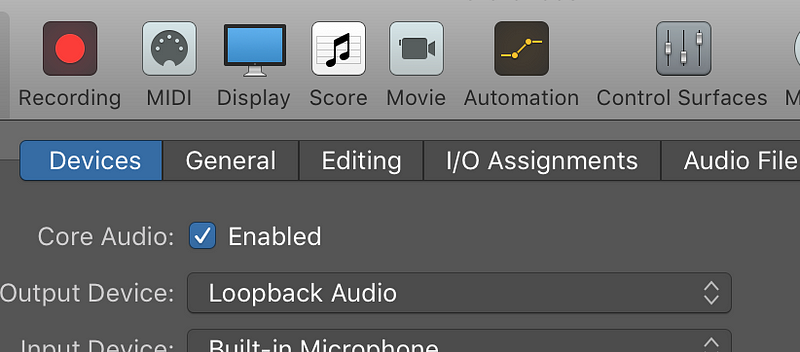
まず、マイクで拾っている声を Mixlr のチャンネル1 に割り振る。これはそのままダイレクトに入力してもよいのだが、Skype から乗ってくるコンプレッサーが強く効いた音量と比べるとバランスが合わない。そこで一度マイク入力を Logic Pro X に入れ、リアルタイムコンプレッサーをかけて、モニタ出力を有効にし、その先を “Loopback Audio” にする。</li>
</ul>

<figure class="image">
  <img src="/blog/img/1zp0Az_6H-4NNQaRC0jMqAg.png" alt="" />
  <figcaption></figcaption>
</figure>

<p>Output Device: Loopback Audioこれで Loopback Audio を mixlr の channel 1 とする。同様に、 Skype の出力を channel 2 にするには、Loopback で Skype チャンネルを作ればよい。</p>

<figure class="image">
  <img src="/blog/img/1oH0VF2riDvI1g4bLaGv2iA.png" alt="" />
  <figcaption></figcaption>
</figure>

<p>Skype to LoopbackSkype の音声は自分でも聴く必要があるので、”Mute audio sources” はオフにする。</p>

<figure class="image">
  <img src="/blog/img/1Vp59mUKlUdVxl06mmpU_ng.png" alt="" />
  <figcaption></figcaption>
</figure>

<p>Loopback + Skype for Mixlr inputs最終的にはこのように Loopback (自分の声) と Skype を別チャンネルにして Mixlr に流している。ストリーム開始前の音楽も、同様に音楽再生ソフトの音を Loopback からキャプチャすればよい。</p>

<p>ちなみに Mixlr 自体の Audio Link でも同等のことはできるはずだが、複数のアプリケーションからの入力を別個に拾うのは難しいかもしれない。</p>

<h3 id="オフライン収録のストリーミング配信">オフライン収録のストリーミング配信</h3>

<p>前述したようにオフライン収録は Zoom H5 ポータブルレコーダーで行っている。H5自体は USB インタフェースにもなるのだが、そうするとSDカードに録音することができなくなるので、録音自体はSDカードに行い、アナログモニタ出力を Mac に入力する方針でストリーミング配信する。</p>

<p><a href="https://www.amazon.co.jp/BEHRINGER-UCA202/dp/B000KW2YEI/?tag=bulknews-22" title="https://www.amazon.co.jp/BEHRINGER-UCA202/dp/B000KW2YEI/?tag=bulknews-22"><strong>Amazon.co.jp: BEHRINGER UCA202: 楽器・音響機器</strong><br />
<em>オンライン通販のAmazon公式サイトなら、BEHRINGER UCA202を 楽器・音響機器ストアで、いつでもお安く。当日お急ぎ便対象商品は、当日お届け可能です。Amazon.co.jpが発送する商品なら配送料無料（条件あり）。</em>www.amazon.co.jp</a><a href="https://www.amazon.co.jp/BEHRINGER-UCA202/dp/B000KW2YEI/?tag=bulknews-22"></a>H5 のモニタ出力 (3.5mm ジャック) を Behringer UCA202 に入力すると、USB 経由で Mac に入力ソースとしてとりこむことができる。この変換のオーディオレベルはとても小さいので、先ほどのSkype の場合と同様、いったん Logic Pro X などのDAWソフトウェアでコンプレッサーをかけ、それを Mixlr に入力する。この場合 Skype などのリモートコールがないため、1トラックで完結し、よりシンプルになる。</p>

<p>ちなみに録音を H5 で行わず、USB インタフェースとして入力し、 Logic で録音しつつモニタリング出力を Mixlr にとばす方法もある。過去何度か試した結果 Mac の負荷が高くなりオーディオのドロップなどが発生したことがあるので、あまりおすすめはしない。また別途録音すればどちらかが失敗してもバックアップが残る安心感がある。</p>

<h2 id="まとめ">まとめ</h2>

<p>たくさんの項目を紹介したが、どれも音をより良くするというより、いかに効率よく、後手間を発生させないかという観点で選んでいる。</p>

<p>まずはじめるにあたって抑えておいてほしいポイントは、</p>

<ul>
  <li>USB ダイナミックマイク</li>
  <li>Skype をそのまま録音</li>
  <li>ノーマライズ、コンプレッサー、可能ならレベラー</li>
  <li>相づちをおさえる
あたりだろうか。追加で質問があれば、Twitter でハッシュタグ #rebuildfm で質問してもらえれば答えるかもしれないし、より細かい内容を今後 <a href="https://rebuild.fm/supporter/">Rebuild サポーター向け</a>にたまに配信しているので、そちらも見てみてほしい。</li>
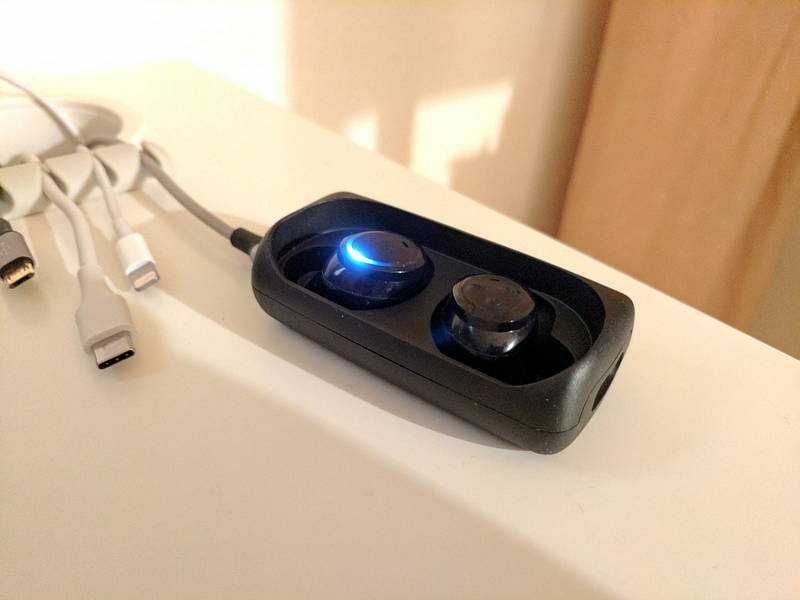
</ul>]]></content><author><name>Tatsuhiko Miyagawa</name></author><summary type="html"><![CDATA[毎年記録しているポッドキャスト収録環境のまとめ。2016年のスナップショットからあまり変更がないので、これから収録する人のレベルにあわせたおすすめのアイテムを項目ごとにまとめてみようと思う。]]></summary></entry><entry><title type="html">Bragi The Headphone</title><link href="https://miyagawa.co/blog/bragi-the-headphone" rel="alternate" type="text/html" title="Bragi The Headphone" /><published>2017-01-17T00:00:00+00:00</published><updated>2017-01-17T00:00:00+00:00</updated><id>https://miyagawa.co/blog/bragi-the-headphone</id><content type="html" xml:base="https://miyagawa.co/blog/bragi-the-headphone"><![CDATA[<p>I ordered <a href="https://www.bragi.com/theheadphone/">The Headphone from Bragi</a> in November, and I finally received it last week. Here’s a review of the wireless earbuds after one week of using it.</p>

<p><a href="https://www.bragi.com/theheadphone/" title="https://www.bragi.com/theheadphone/"><strong>The Headphone - Bragi</strong><br />
<em>Bragi - experience the world’s first wireless smart headphones</em>www.bragi.com</a><a href="https://www.bragi.com/theheadphone/"></a>Bragi’s The Headphone is a truly wireless earbud, meaning these are just earbuds, and no cable between them, similar to Apple’s AirPods or EARIN. Unlike Bragi’s previous model, <a href="https://www.bragi.com/thedash/">The Dash</a>, The Headphone does *not *have:</p>

<ul>
  <li>Internal storage and music player</li>
  <li>Charging carry case</li>
  <li>Fitness tracker</li>
  <li>Touch sensor
but it has a longer battery life, said 6 hours, and in half of the price ($150).</li>
</ul>

<h4 id="the-fit">The Fit</h4>

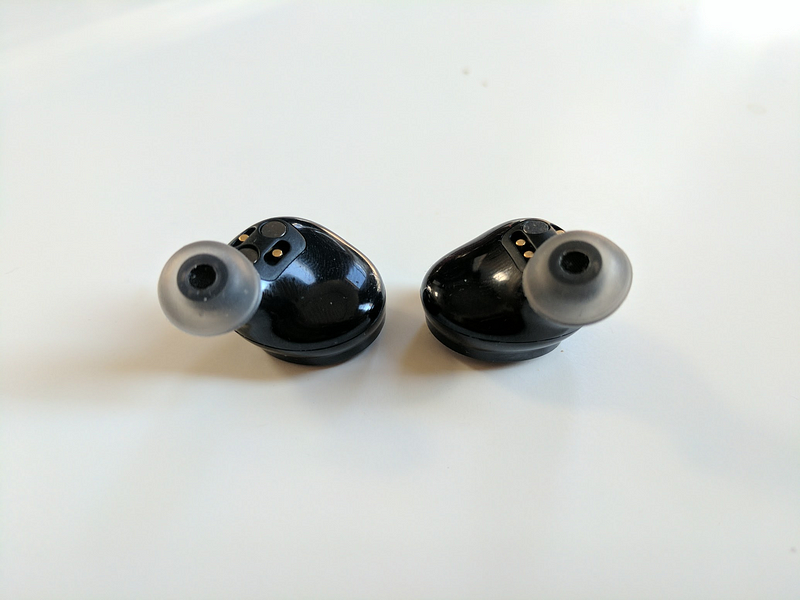
<p>It is very important to have a comfortable and solid fit to the ear, so that I would not drop and lose the earbuds. The Headphone comes with 2 sizes of ear tips (S/M) and slightly bigger foam. I tested both the foam and M-size ear tips, and they both fit to ears comfortably.</p>

<p>The foam piece would be better if your ear is bigger and/or you prefer a tight fit and strong bass from the music. For me, M-size ear tips worked great even with longer hours of wearing.</p>

<figure class="image">
  <img src="/blog/img/1y7Etidc-fipu4z32U4U5kA.png" alt="" />
  <figcaption></figcaption>
</figure>

<p>The Headphone with M-size ear tips</p>
<h4 id="pairing">Pairing</h4>

<p>Turning on and off the headphone could be a little easier. Turning on requires long-pressing the button on the right side for 1 second. It would be nice if it automatically turns on when I take it out from the charger, like Apple AirPods do.</p>

<p>Turning off is done either by long-pressing the same button for 3 seconds, or putting the earbuds to the case *and *connecting to the charging cable. The latter is a much easier action when I get home, but it is still annoying that putting back the earbud to the case alone is not enough to turn off the device.</p>

<p>Apparently it can automatically go into a sleep mode when no audio has been playing for 10 minutes, but that did not work for me when paired with my Google Pixel phone.</p>

<p>I’ve used <a href="https://www.amazon.com/Anker-SoundBuds-Headphones-Cancellation-Compatible/dp/B01E6XSTEK">Anker IE-20</a> for about a year and the nice thing about it is that it automatically powers on/off with the magnet. It means that it powers on when I wear it, and powers off when I do not.</p>

<p><a href="https://www.amazon.com/Anker-SoundBuds-Headphones-Cancellation-Compatible/dp/B01DZXFB1Q" title="https://www.amazon.com/Anker-SoundBuds-Headphones-Cancellation-Compatible/dp/B01DZXFB1Q"><strong>Anker SoundBuds Sport IE20 In-Ear Bluetooth Earbuds, Smart Magnetic Wireless Headphones with aptx…</strong><br />
<em>Edit description</em>www.amazon.com</a><a href="https://www.amazon.com/Anker-SoundBuds-Headphones-Cancellation-Compatible/dp/B01DZXFB1Q"></a></p>
<h4 id="connectionsound">Connection/Sound</h4>

<p>Once it’s paired, the connection is solid. I’ve used many Bluetooth headsets like Anker’s IE-20 and Sony’s SBH-20 before, and have always experienced some audio drops in busy areas — I’ve never experienced any drops with The Headphone yet.</p>

<p>The sound is decent, and once you get a tight fit of the ear tips (see above for the fitting), you get a good bass sound as well.</p>

<p>When you listen to audio source with a bit of silence in-between, like podcasts, you might constantly hear a slight static noise getting in and out, on the left side of the earbud. The noise is <em>very</em> subtle, and is hard to notice when you’re in a loud environment, or when you listen to regular music without much silence, though.</p>

<h4 id="controls">Controls</h4>

<p>One of the complaints I hear most from Apple’s AirPods users is that it does not have audio controls for volumes and playbacks.</p>

<p>The Headphone has three buttons on the right side, and it provides these features, to control the volume, pause and skip the songs. While it is really nice to have them on the device, it is very uncomfortable to click these buttons while you wear it. You either have to pinpoint the button and click it with a nail, or just push hard the earbud to register the clicks.</p>

<p>I imagine that the touch sensor on The Dash would have been much easier to use.</p>

<h4 id="charging">Charging</h4>

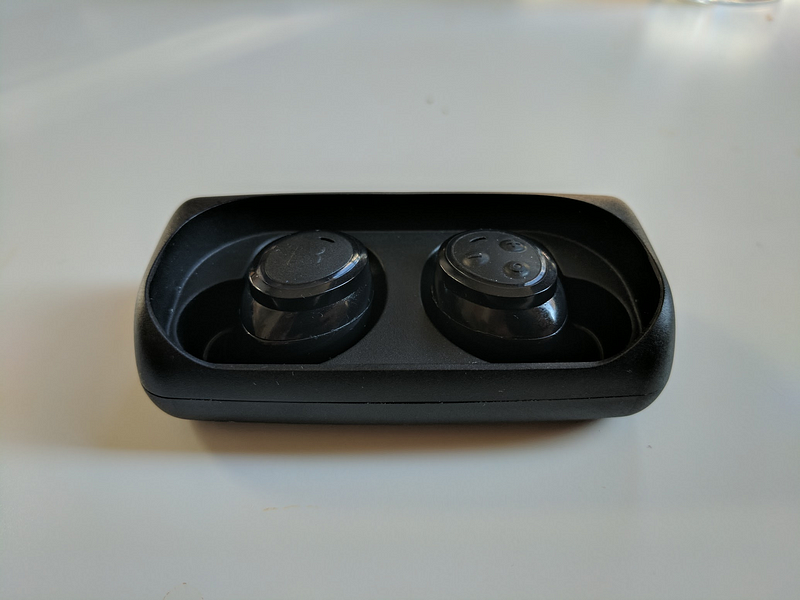
<p>The Headphone comes with a carrying case, and it has a micro USB connector to charge. The case <em>does not</em> have a battery to provide its power when it is disconnected to the charger, which is a bit of a bummer.</p>

<figure class="image">
  <img src="/blog/img/1tmXL63hYmCLwApBo8NXNaQ.png" alt="" />
  <figcaption></figcaption>
</figure>

<p>Honestly, the case is a bit too bulky just for a carrying case. For the last couple of days, I just leave the case plugged all the time on my desk, and carry the earbuds in a much smaller pouch in my pocket. This way I can just remove the earbuds and drop them on the charger when I’m home. Obviously, the downside of this setup is I cannot charge the earbuds when it runs out of the juice, after 6 hours of use.</p>

<figure class="image">
  <img src="/blog/img/1Zh-fK0hm4qQqxi_3VtHg5w.png" alt="" />
  <figcaption></figcaption>
</figure>

<h4 id="summary">Summary</h4>

<p>Overall I like it and would use this most of the time in my commute to the office and in the office when I want to shut the ambient sound. I keep my Anker IE-20 to pair it with my laptop, since multipoint pairing on Bluetooth is still a nightmare in 2017.</p>

<ul>
  <li>Great comfortable fit 👍</li>
  <li>Good Bluetooth connection 👍</li>
  <li>Solid audio with subtle static noise in silence 👍</li>
  <li>Control clicks are annoying 😞</li>
  <li>Turning on/off could be more automatic 😞</li>
  <li>Bulky carrying case without charger 😞</li>
</ul>]]></content><author><name>Tatsuhiko Miyagawa</name></author><summary type="html"><![CDATA[I ordered The Headphone from Bragi in November, and I finally received it last week. Here’s a review of the wireless earbuds after one week of using it.]]></summary></entry><entry><title type="html">Mac: Routing Links to Chrome Profiles</title><link href="https://miyagawa.co/blog/mac-routing-links-to-chrome-profiles" rel="alternate" type="text/html" title="Mac: Routing Links to Chrome Profiles" /><published>2017-01-03T00:00:00+00:00</published><updated>2017-01-03T00:00:00+00:00</updated><id>https://miyagawa.co/blog/mac--routing-links-to-chrome-profiles</id><content type="html" xml:base="https://miyagawa.co/blog/mac-routing-links-to-chrome-profiles"><![CDATA[<h4 id="with-choosy-and-google-chrome-canary">with Choosy and Google Chrome Canary</h4>

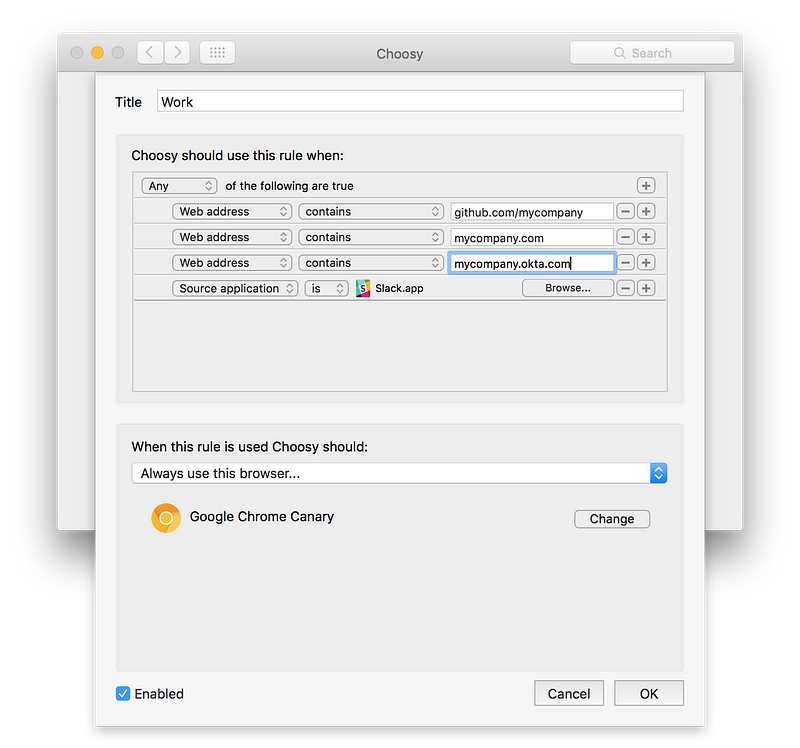
<p>Assume you’re a Chrome user and have multiple Google profiles, one for your personal account and another for work account. This way you can sign in to sites like Google Apps, GitHub or Slack with the correct account.</p>

<h4 id="the-problem">The Problem</h4>

<p>On Mac OS, Chrome profiles work under one Chrome app instance, which means when you click a link from other apps such as Mail, Twitter clients or Slack app, it will open in the <em>last</em> browser window you opened. This gets you into a situation where you click an internal Wiki link from Slack which opens in your personal profile window, which gets you redirected to your company’s SSO page (such as Okta) because you’re not signed in. Ugh! Now you go back to the <em>other</em> window to make sure it is forefront, then re-open the link. This is obviously tedious.</p>

<h4 id="solution">Solution</h4>

<p>Enter <a href="https://www.choosyosx.com/">Choosy</a>: a browser shim that sends links to the right browser of your choice.</p>

<figure class="image">
  <img src="/blog/img/1lPPD7K1nf1K5vZY4Ns39lg.png" alt="" />
  <figcaption></figcaption>
</figure>

<p>Choosy is designed for users who would like to open a particular link in a browser that’s different from the primary (default) browser.</p>

<p>Here’s the tricky bit: in my use case, there’s no non-default browsers involved. It’s both Google Chrome, just under a different profile, and the way <a href="https://www.chromium.org/developers/creating-and-using-profiles">Chrome User Profiles</a> works is not really designed to operate under multiple Chrome <em>instances</em>.</p>

<p>It definitely seems possible to play <a href="http://stackoverflow.com/questions/5451439/managing-multiple-chrome-profiles-osx">with an AppleScript</a> and then mess around <a href="https://yourmacguy.wordpress.com/2013/07/17/make-your-own-url-handler/">URL handlers with plist files</a> to create a separate Chrome app instance, but there’s a much easier way to get this done: <a href="https://www.google.com/chrome/browser/canary.html">Chrome Canary.</a></p>

<p>Unlike Chrome beta or dev channel, Chrome Canary operates as a complete separate app instance. This allows you to sign in to your personal account with primary Chrome, then to the work account with Chrome Canary, and they’re recognized as completely different browser applications by the system.</p>

<p>Now, all you need to do is to configure Choosy:</p>

<figure class="image">
  <img src="/blog/img/1h1ahSlNHMVgiIu6SvKLgEQ.png" alt="" />
  <figcaption></figcaption>
</figure>

<p>Rules to override Work link addressesYou can list as many enterprise/SaaS domains such as Okta, Zendesk, GitHub Enterprise and so on as an individual rule, and use “Any” to combine the rules.</p>

<p>As of this writing, the “Source application” setting seems to be kind of unreliable according to <a href="https://twitter.com/choosyosx/with_replies">the developer</a>. It is alright for me, since I use Slack for multiple teams and I do not want all links opened from Slack to go to my Work profile.</p>

<p>You can also add a modifier key such as Shift to force-enable or disable the particular override rules. I set it so that shift-clicking links in Slack always results to open in a work profile.</p>

<p>**Tip: **It is recommended to use one of <a href="https://chrome.google.com/webstore/category/themes">Chrome themes</a> to easily identify which browser profile you’re using. I chose <a href="https://chrome.google.com/webstore/detail/simple-red-theme/ealcinkolodcnkokioepdoheohkffejc">the one</a> that is similar to our <a href="https://www.fastly.com/">corporate color scheme</a> 😁</p>]]></content><author><name>Tatsuhiko Miyagawa</name></author><summary type="html"><![CDATA[with Choosy and Google Chrome Canary]]></summary></entry><entry><title type="html">Things I Bought In 2016</title><link href="https://miyagawa.co/blog/things-i-bought-in-2016" rel="alternate" type="text/html" title="Things I Bought In 2016" /><published>2016-12-31T00:00:00+00:00</published><updated>2016-12-31T00:00:00+00:00</updated><id>https://miyagawa.co/blog/things-i-bought-in-2016</id><content type="html" xml:base="https://miyagawa.co/blog/things-i-bought-in-2016"><![CDATA[<p>なんか流行ってるみたいなので。</p>

<h4 id="google-pixel">Google Pixel</h4>

<p><a href="https://madeby.google.com/phone/" title="https://madeby.google.com/phone/"><strong>Made by Google</strong><br />
<em>It has the highest rated smartphone camera. Ever. A battery that lasts all day. Unlimited storage for all your photos…</em>madeby.google.com</a><a href="https://madeby.google.com/phone/"></a>いままでの Nexus 端末って、「まぁ Google 使ってて Android 好きってんならいいんじゃないですかね …」って後ろ向きな感じでしかオススメできなかったんだけど、この端末は違う。妥協せずに作った感がだいぶあって、OSとハードがいい具合に融合してるし、何よりカメラが素晴らしい。日本での発売、だいぶ音沙汰ないですね。</p>

<h4 id="lumsing-usb-c-powerbank">Lumsing USB-C Powerbank</h4>

<p><a href="http://amzn.to/2hBDgIi" title="http://amzn.to/2hBDgIi"><strong>Lumsing USB C External Battery Pack 10050 mAh, Quick Charge 3.0 Power Bank USB-C Battery Charger…</strong><br />
<em>Edit description</em>amzn.to</a><a href="http://amzn.to/2hBDgIi"></a>USB-C なスマートフォンは Nexus 5X についで 2台めなんだけど、以前から使っていた Anker Astro では、外でチャージするときのスピードが “Charging rapidly” になってくれないのが気になってた、というか気づくレベルで遅い。</p>

<p>ただ巷に出てる USB-C 対応のモバイルバッテリーはどれもごつい。Anker の<a href="https://www.anker.com/products/A1371012">これ</a>とか鈍器レベル。どれもスマートフォンだけじゃなくてタブレットとか MacBook とか充電する仕様で作られてるので、でかいんですね。</p>

<p>この Lumsing は 10050 mAh と手頃なサイズで、 USB-C 急速充電と QuickCharge 2/3 にも対応してる。札幌と台湾旅行中は活躍してくれました。だいたい 10% から 50% まで 20分程度でチャージできて、ちょっと電車で移動中とかカフェとかで休憩してるうちにかなり回復できるので心強い。</p>

<h4 id="omaker-reversible-micro-usb-cable">Omaker Reversible Micro-USB cable</h4>

<p><a href="https://www.amazon.co.jp/Omaker-%E3%83%9E%E3%82%A4%E3%82%AF%E3%83%ADUSB%E3%82%B1%E3%83%BC%E3%83%96%E3%83%AB-%E3%83%AA%E3%83%90%E3%83%BC%E3%82%B7%E3%83%96%E3%83%ABUSB%E3%83%A1%E3%82%B9-%E3%82%AA%E3%82%B9%E7%AB%AF%E5%AD%90%E6%90%AD%E8%BC%89-%E8%80%90%E4%B9%85%E6%80%A7%E7%AC%AC%E4%B8%80%E3%81%AE%E3%82%B9%E3%83%9E%E3%83%9B%E5%85%85%E9%9B%BBmicroUSB%E3%82%B1%E3%83%BC%E3%83%96%E3%83%AB%EF%BC%88%E3%82%B7%E3%83%AB%E3%83%90%E3%83%BC%EF%BC%891m/dp/B0199KDVAW/?tag=bulknews-22" title="https://www.amazon.co.jp/Omaker-%E3%83%9E%E3%82%A4%E3%82%AF%E3%83%ADUSB%E3%82%B1%E3%83%BC%E3%83%96%E3%83%AB-%E3%83%AA%E3%83%90%E3%83%BC%E3%82%B7%E3%83%96%E3%83%ABUSB%E3%83%A1%E3%82%B9-%E3%82%AA%E3%82%B9%E7%AB%AF%E5%AD%90%E6%90%AD%E8%BC%89-%E8%80%90%E4%B9%85%E6%80%A7%E7%AC%AC%E4%B8%80%E3%81%AE%E3%82%B9%E3%83%9E%E3%83%9B%E5%85%85%E9%9B%BBmicroUSB%E3%82%B1%E3%83%BC%E3%83%96%E3%83%AB%EF%BC%88%E3%82%B7%E3%83%AB%E3%83%90%E3%83%BC%EF%BC%891m/dp/B0199KDVAW/?tag=bulknews-22"><strong>Omaker マイクロUSBケーブル 2本セット リバーシブルUSBメス/オス端子搭載(二重保護 両端両面挿し)耐久性第一のスマホ充電microUSBケーブル（シルバー）1m</strong><br />
<em>Amazon.co.jp： Omaker マイクロUSBケーブル 2本セット リバーシブルUSBメス/オス端子搭載(二重保護 両端両面挿し)耐久性第一のスマホ充電microUSBケーブル（シルバー）1m: 銅: 家電・カメラ</em>www.amazon.co.jp</a><a href="https://www.amazon.co.jp/Omaker-%E3%83%9E%E3%82%A4%E3%82%AF%E3%83%ADUSB%E3%82%B1%E3%83%BC%E3%83%96%E3%83%AB-%E3%83%AA%E3%83%90%E3%83%BC%E3%82%B7%E3%83%96%E3%83%ABUSB%E3%83%A1%E3%82%B9-%E3%82%AA%E3%82%B9%E7%AB%AF%E5%AD%90%E6%90%AD%E8%BC%89-%E8%80%90%E4%B9%85%E6%80%A7%E7%AC%AC%E4%B8%80%E3%81%AE%E3%82%B9%E3%83%9E%E3%83%9B%E5%85%85%E9%9B%BBmicroUSB%E3%82%B1%E3%83%BC%E3%83%96%E3%83%AB%EF%BC%88%E3%82%B7%E3%83%AB%E3%83%90%E3%83%BC%EF%BC%891m/dp/B0199KDVAW/?tag=bulknews-22"></a>USB-C に統一する未来は見えている中、micro USB なデバイスもなかなか消えてはくれない。これはリバーシブルタイプの micro USB で、既存のデバイスでもそのまま使える。てか、スペック変えずにリバーシブルにできるならなんで最初からそうじゃなかったのかと疑問になる。 ともあれ、Bluetooth ヘッドセット、QC20, Kindle などで活躍してます。やっぱり上下を気にせずさせるのって素晴らしい。</p>

<h4 id="bluelounge-cabledrop">Bluelounge CableDrop</h4>

<p><a href="https://www.amazon.com/Bluelounge-CableDrop-Multi-White-Management/dp/B01GQRFSX4/ref=as_li_ss_tl?ie=UTF8&amp;qid=1483096556&amp;sr=8-4&amp;keywords=bluelounge+cabledrop&amp;linkCode=ll1&amp;tag=bulknewstypep-20&amp;linkId=783105300e513775312b6aa7473be6de" title="https://www.amazon.com/Bluelounge-CableDrop-Multi-White-Management/dp/B01GQRFSX4/ref=as_li_ss_tl?ie=UTF8&amp;qid=1483096556&amp;sr=8-4&amp;keywords=bluelounge+cabledrop&amp;linkCode=ll1&amp;tag=bulknewstypep-20&amp;linkId=783105300e513775312b6aa7473be6de"><strong>Bluelounge CableDrop Multi White - Cable Management System</strong><br />
<em>Amazon.com: Bluelounge CableDrop Multi White - Cable Management System: Home Audio &amp; Theater</em>www.amazon.com</a><a href="https://www.amazon.com/Bluelounge-CableDrop-Multi-White-Management/dp/B01GQRFSX4/ref=as_li_ss_tl?ie=UTF8&amp;qid=1483096556&amp;sr=8-4&amp;keywords=bluelounge+cabledrop&amp;linkCode=ll1&amp;tag=bulknewstypep-20&amp;linkId=783105300e513775312b6aa7473be6de"></a>そんなわけで過渡期に混沌としているケーブルをまとめるホルダーがこちら。前にも似たようなのをつかっていたんだけど、Bluelounge のこれはサイズもほどよく、3M の両面テープも最初からついていて、うちの白 IKEA デスクにぴったり。</p>

<blockquote>
  <p><a href="https://twitter.com/miyagawa/status/764622115341414400"></a></p>
  <h4 id="kindle-oasis">Kindle Oasis</h4>
</blockquote>

<p><a href="https://www.amazon.co.jp/Kindle-Oasis-Wi-Fi-%E3%83%90%E3%83%83%E3%83%86%E3%83%AA%E3%83%BC%E5%86%85%E8%94%B5%E3%83%AC%E3%82%B6%E3%83%BC%E3%82%AB%E3%83%90%E3%83%BC%E4%BB%98%E5%B1%9E-%E3%82%AD%E3%83%A3%E3%83%B3%E3%83%9A%E3%83%BC%E3%83%B3%E6%83%85%E5%A0%B1%E3%81%A4%E3%81%8D%E3%83%A2%E3%83%87%E3%83%AB/dp/B010EJWHUC/?tag=bulknews-22" title="https://www.amazon.co.jp/Kindle-Oasis-Wi-Fi-%E3%83%90%E3%83%83%E3%83%86%E3%83%AA%E3%83%BC%E5%86%85%E8%94%B5%E3%83%AC%E3%82%B6%E3%83%BC%E3%82%AB%E3%83%90%E3%83%BC%E4%BB%98%E5%B1%9E-%E3%82%AD%E3%83%A3%E3%83%B3%E3%83%9A%E3%83%BC%E3%83%B3%E6%83%85%E5%A0%B1%E3%81%A4%E3%81%8D%E3%83%A2%E3%83%87%E3%83%AB/dp/B010EJWHUC/?tag=bulknews-22"><strong>Kindle Oasis - 最薄・最軽量。革新的なデザイン</strong><br />
<em>Kindle Oasisはこれまでで最も薄く、最も軽いKindleです。人間工学に基づいた特徴的なデザインにより、手の中に重心が収まるので、端末の重量を気にせず読書に集中できるように設計されています。これまで以上にいつでもどこでも読書を…</em>www.amazon.co.jp</a><a href="https://www.amazon.co.jp/Kindle-Oasis-Wi-Fi-%E3%83%90%E3%83%83%E3%83%86%E3%83%AA%E3%83%BC%E5%86%85%E8%94%B5%E3%83%AC%E3%82%B6%E3%83%BC%E3%82%AB%E3%83%90%E3%83%BC%E4%BB%98%E5%B1%9E-%E3%82%AD%E3%83%A3%E3%83%B3%E3%83%9A%E3%83%BC%E3%83%B3%E6%83%85%E5%A0%B1%E3%81%A4%E3%81%8D%E3%83%A2%E3%83%87%E3%83%AB/dp/B010EJWHUC/?tag=bulknews-22"></a>これで4台目になる Kindle Oasis. これもすばらしくて何の文句もつけようがない。サクサク動くし、フォントもきれい、カバーでチャージしながら、外して読むと軽いし片手で持てる。</p>

<p>日本版では Paperwhite のマンガ仕様（ストレージ8GB）が出たみたいだけど、 Oasis にもほしいですね。結構すぐいっぱいになっちゃうので。</p>

<h4 id="thinkpad-track-point-keyboard">ThinkPad Track Point Keyboard</h4>

<p><a href="https://www.amazon.co.jp/%E3%83%AC%E3%83%8E%E3%83%9C-%E3%82%B8%E3%83%A3%E3%83%91%E3%83%B3-ThinkPad-%E3%83%88%E3%83%A9%E3%83%83%E3%82%AF%E3%83%9D%E3%82%A4%E3%83%B3%E3%83%88-%E3%82%AD%E3%83%BC%E3%83%9C%E3%83%BC%E3%83%89-%E8%8B%B1%E8%AA%9E-0B47190/dp/B00DLK4GN8/?tag=bulknews-22" title="https://www.amazon.co.jp/%E3%83%AC%E3%83%8E%E3%83%9C-%E3%82%B8%E3%83%A3%E3%83%91%E3%83%B3-ThinkPad-%E3%83%88%E3%83%A9%E3%83%83%E3%82%AF%E3%83%9D%E3%82%A4%E3%83%B3%E3%83%88-%E3%82%AD%E3%83%BC%E3%83%9C%E3%83%BC%E3%83%89-%E8%8B%B1%E8%AA%9E-0B47190/dp/B00DLK4GN8/?tag=bulknews-22"><strong>Amazon.co.jp： レノボ・ジャパン ThinkPad トラックポイント・キーボード - 英語 0B47190: パソコン・周辺機器</strong><br />
<em>オンライン通販のAmazon公式サイトなら、レノボ・ジャパン ThinkPad トラックポイント・キーボード - 英語 0B47190を パソコン・周辺機器ストアで、いつでもお安く。当日お急ぎ便対象商品は、当日お届け可能です。アマゾン配…</em>www.amazon.co.jp</a><a href="https://www.amazon.co.jp/%E3%83%AC%E3%83%8E%E3%83%9C-%E3%82%B8%E3%83%A3%E3%83%91%E3%83%B3-ThinkPad-%E3%83%88%E3%83%A9%E3%83%83%E3%82%AF%E3%83%9D%E3%82%A4%E3%83%B3%E3%83%88-%E3%82%AD%E3%83%BC%E3%83%9C%E3%83%BC%E3%83%89-%E8%8B%B1%E8%AA%9E-0B47190/dp/B00DLK4GN8/?tag=bulknews-22"></a>2016年に買うべきもの、ではないと思うんだけど、会社でスタンディングデスクでタイプする時にトラックパッドに手をのばすのがだるいな、と思い購入した ThinkPad Keyboard。なかなかタイピングの打ち心地もよいし、ホームポジションから腕を動かさずに Track Point で動かせるのはやっぱりよいですね。コンパクトだし USB給電で充電の心配もなく、旅行にも持っていけるサイズ。</p>

<p>結果気に入ったので家でも Apple Keyboard をリプレース。とはいえ Logic Pro X なんかで podcast 編集したり、Lightroom で写真いじったり、なんかのときはやっぱりトラックパッドのほうが便利なので個人用では併用してます。</p>

<h4 id="panasonic-er-gn30-k">Panasonic ER-GN30-K</h4>

<p><a href="https://www.amazon.co.jp/%E3%83%91%E3%83%8A%E3%82%BD%E3%83%8B%E3%83%83%E3%82%AF-Panasonic-ER-GN30-K-%E3%82%A8%E3%83%81%E3%82%B1%E3%83%83%E3%83%88%E3%82%AB%E3%83%83%E3%82%BF%E3%83%BC-%E9%BB%92/dp/B003XOS4NA/?tag=bulknews-22" title="https://www.amazon.co.jp/%E3%83%91%E3%83%8A%E3%82%BD%E3%83%8B%E3%83%83%E3%82%AF-Panasonic-ER-GN30-K-%E3%82%A8%E3%83%81%E3%82%B1%E3%83%83%E3%83%88%E3%82%AB%E3%83%83%E3%82%BF%E3%83%BC-%E9%BB%92/dp/B003XOS4NA/?tag=bulknews-22"><strong>Amazon.co.jp： パナソニック エチケットカッター 黒 ER-GN30-K: ホーム&amp;キッチン</strong><br />
<em>オンライン通販のAmazon公式サイトなら、パナソニック エチケットカッター 黒 ER-GN30-Kを ホーム&amp;キッチンストアで、いつでもお安く。当日お急ぎ便対象商品は、当日お届け可能です。アマゾン配送商品は、通常送料無料。</em>www.amazon.co.jp</a><a href="https://www.amazon.co.jp/%E3%83%91%E3%83%8A%E3%82%BD%E3%83%8B%E3%83%83%E3%82%AF-Panasonic-ER-GN30-K-%E3%82%A8%E3%83%81%E3%82%B1%E3%83%83%E3%83%88%E3%82%AB%E3%83%83%E3%82%BF%E3%83%BC-%E9%BB%92/dp/B003XOS4NA/?tag=bulknews-22"></a>だいぶ昔に naoya さんがオススメしていて買って以来、たまに買い替えている Panasonic のいわゆる鼻毛カッター。基本的にあんまり髭が生えないほうなので、そちらもこれで十分処理できる。これは新しめのモデルみたいで、以前のやつに比べて音も小さく、底面積もだいぶコンパクトになっていて、よいアップデート。</p>

<p>この記事を書きながら調べたところによると、洗浄するのにいちいち刃を取り外さなくてもいいんですね。なんて画期的。前と同じと思ってマニュアル読んでなかった。</p>

<h4 id="samsung-t3-ssd">Samsung T3 SSD</h4>

<p><a href="https://www.amazon.co.jp/Samsung-USB3-1-TYPE-C-450MB-MU-PT500B/dp/B01DNKTRWK/?tag=bulknews-22" title="https://www.amazon.co.jp/Samsung-USB3-1-TYPE-C-450MB-MU-PT500B/dp/B01DNKTRWK/?tag=bulknews-22"><strong>Samsung SSD USB3.1 Gen1 TYPE-C 450MB/ｓ MU-PT500B サムスン T3 500GB [並行輸入品]</strong><br />
<em>高速データ転送 従来の2.5 “ポータブルハードディスクドライブ（HDD）よりも4倍まで、最大450メガバイト/秒</em>の高速読み出し/書き込み速度です。 小型、軽量・名刺サイズの軽量ボディSamsung V-NANDテクノロジー強固なメタ…*www.amazon.co.jp</a><a href="https://www.amazon.co.jp/Samsung-USB3-1-TYPE-C-450MB-MU-PT500B/dp/B01DNKTRWK/?tag=bulknews-22"></a>MacBook Pro Late 2013 で SSD 512GB を使ってるんですが、旅行中とかどうしても写真やらポッドキャストの生音源やらでストレージが不安になる。このサムソンの SSD は名刺サイズで 500GB、めっちゃコンパクトで軽いし、どこにでも持っていける感じ。$200 そこらで買えちゃうんで、MacBook のストレージが足りなくて、って人にはおすすめですね。</p>

<h4 id="shure-mv88">Shure MV88</h4>

<p><a href="https://www.amazon.co.jp/%E5%9B%BD%E5%86%85%E6%AD%A3%E8%A6%8F%E5%93%81-SHURE-iPhone-iPad%E7%94%A8%E3%83%9E%E3%82%A4%E3%82%AF-MOTIV%E3%82%B7%E3%83%AA%E3%83%BC%E3%82%BA-MV88A/dp/B01GE2L1SC/?tag=bulknews-22" title="https://www.amazon.co.jp/%E5%9B%BD%E5%86%85%E6%AD%A3%E8%A6%8F%E5%93%81-SHURE-iPhone-iPad%E7%94%A8%E3%83%9E%E3%82%A4%E3%82%AF-MOTIV%E3%82%B7%E3%83%AA%E3%83%BC%E3%82%BA-MV88A/dp/B01GE2L1SC/?tag=bulknews-22"><strong>Amazon.co.jp: 【国内正規品】SHURE iPhone iPad用マイク MV88 MOTIVシリーズ 24bit/48kHz MV88A-A: 楽器・音響機器</strong><br />
<em>オンライン通販のAmazon公式サイトなら、【国内正規品】SHURE iPhone iPad用マイク MV88 MOTIVシリーズ 24bit/48kHz MV88A-Aを 楽器・音響機器ストアで、いつでもお安く。当日お急ぎ便対象商品は…</em>www.amazon.co.jp</a><a href="https://www.amazon.co.jp/%E5%9B%BD%E5%86%85%E6%AD%A3%E8%A6%8F%E5%93%81-SHURE-iPhone-iPad%E7%94%A8%E3%83%9E%E3%82%A4%E3%82%AF-MOTIV%E3%82%B7%E3%83%AA%E3%83%BC%E3%82%BA-MV88A/dp/B01GE2L1SC/?tag=bulknews-22"></a>iPhone/iPad につけて利用できるコンデンサマイク。Shure 製だけあって音質はもちろん問題ないし、なにより lightning 端子につないでそのまま録音できる気楽さがすばらしい。</p>

<p>残念ながら iPhone 使いではないので iPod touch と一緒に持ち歩くことになりますが、それでもフルのレコーディングキットとは比べ物にならないし、ふとしたところで収録ができたり、iPhone 7 使いの人なら、動画のオーディオソースとしてももちろん利用できる。 <a href="http://rebuild.fm/">Rebuild</a> の本編では利用していないけど、ちょっとしたインタビューエピソードや<a href="https://rebuild.fm/supporter/">サポーター限定</a>の撮って出しなエピソードでは重宝しています。</p>

<p>願わくばこれの USB-C 版がでて Google Pixel で使えれば。。 Shure さん、お願いしますよ。</p>

<h4 id="ps4">PS4</h4>

<p><a href="https://www.amazon.co.jp/PlayStation-4-%E3%82%B8%E3%82%A7%E3%83%83%E3%83%88-%E3%83%96%E3%83%A9%E3%83%83%E3%82%AF-500GB-CUH-2000AB01/dp/B01LPTFJLO/?tag=bulknews-22" title="https://www.amazon.co.jp/PlayStation-4-%E3%82%B8%E3%82%A7%E3%83%83%E3%83%88-%E3%83%96%E3%83%A9%E3%83%83%E3%82%AF-500GB-CUH-2000AB01/dp/B01LPTFJLO/?tag=bulknews-22"><strong>PlayStation 4 ジェット・ブラック 500GB(CUH-2000AB01)</strong><br />
<em>オンライン通販のAmazon公式サイトなら、PlayStation 4 ジェット・ブラック 500GB(CUH-2000AB01)を ゲームストアで、いつでもお安く。当日お急ぎ便対象商品は、当日お届け可能です。アマゾン配送商品は、通常送…</em>www.amazon.co.jp</a><a href="https://www.amazon.co.jp/PlayStation-4-%E3%82%B8%E3%82%A7%E3%83%83%E3%83%88-%E3%83%96%E3%83%A9%E3%83%83%E3%82%AF-500GB-CUH-2000AB01/dp/B01LPTFJLO/?tag=bulknews-22"></a>そろそろ買ってもいいよね、ってことで購入。Black Friday でバンドル $200 で買えました。まだ FF XV しかやってない。○☓ボタンが US システムと JP ゲームで逆になる問題、どうにかならんすかね。</p>]]></content><author><name>Tatsuhiko Miyagawa</name></author><summary type="html"><![CDATA[なんか流行ってるみたいなので。]]></summary></entry></feed>